
To send a request through a proxy with Python's requests, pass a proxies dictionary with both an "http" and an "https" key: requests.get(url, proxies={"http": proxy, "https": proxy}), where proxy is http://USERNAME:PASSWORD@HOST:PORT. Leave out the "https" key and every https:// request quietly skips the proxy. Our tests found two more traps worth knowing before you build on it: a system proxy setting can override session.proxies, and a Session reuses one connection, so a rotating proxy cannot change the IP between its requests.
Install
pip install requests
pip install "requests[socks]"   # only for SOCKS5 proxies
Send a request through a proxy
import requests

proxy = "http://USERNAME:PASSWORD@HOST:PORT"
proxies = {"http": proxy, "https": proxy}

response = requests.get("https://ipinfo.io/json", proxies=proxies, timeout=15)
response.raise_for_status()
print(response.json())
It prints a dictionary with the exit ip, its city, country and org: what the website sees. Always set a timeout; without one, a request through an unresponsive proxy can wait indefinitely.
Why both keys matter
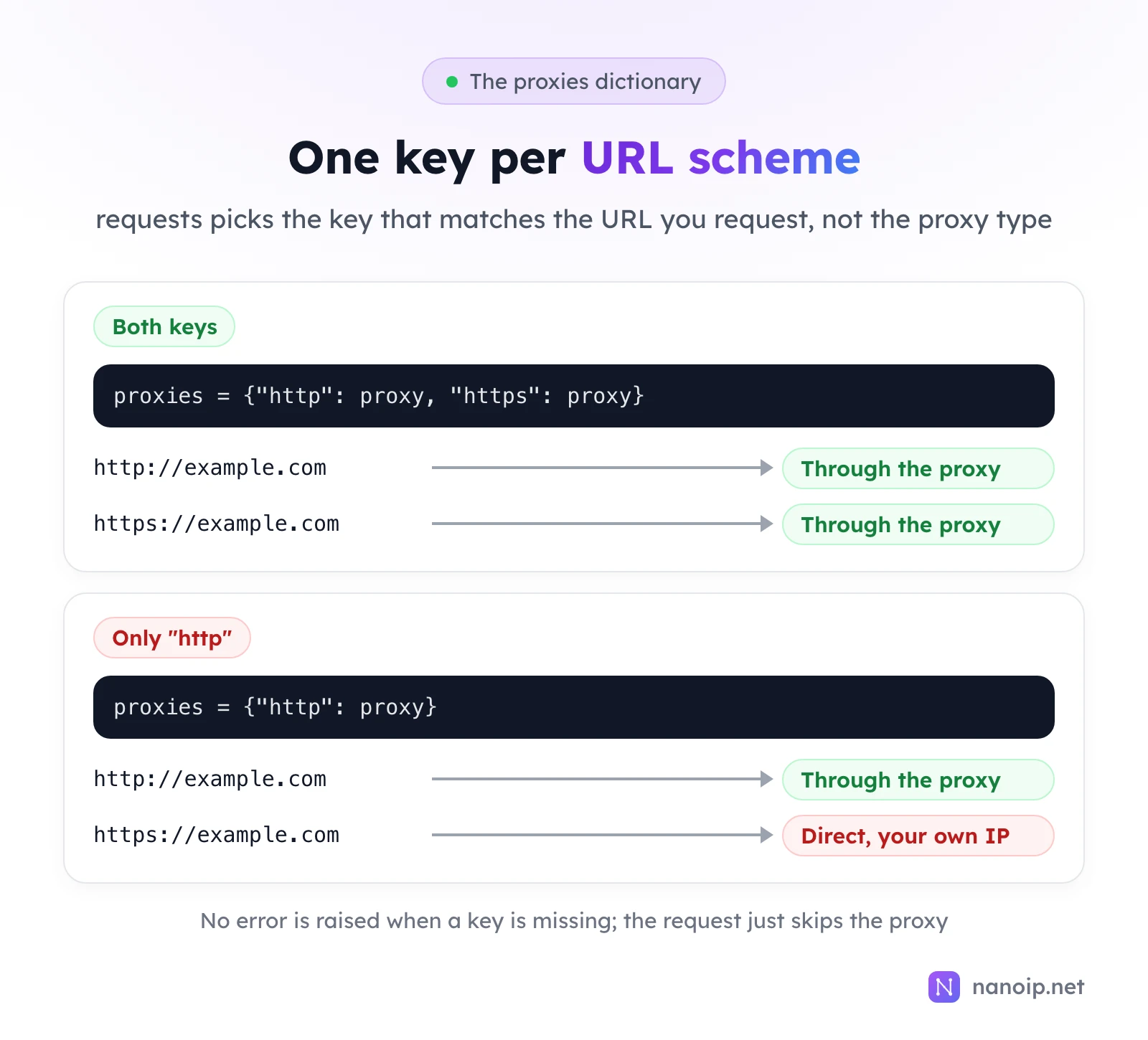
The keys name the scheme of the URL you request, not the type of proxy. In our test, proxies={"http": proxy} with an https:// URL returned the page normally, and the proxy's log showed nothing: the request had gone out directly from our own IP. Always set both keys to the same proxy.
Passwords with special characters
The login sits inside the proxy URL, so characters such as @, :, / and # must be encoded or the URL splits in the wrong place. Let Python do it:
from urllib.parse import quote

import requests

username = "USERNAME"
password = quote("PASSWORD", safe="")  # encodes @ : / # and other special characters
proxy = f"http://{username}:{password}@HOST:PORT"

session = requests.Session()
session.proxies = {"http": proxy, "https": proxy}

for _ in range(3):
    print(session.get("https://ipinfo.io/ip", timeout=15).text.strip())
We tested it with the password p@ss:word, which quote turned into p%40ss%3Aword. Before reusing this Session pattern, read the next two sections.
Trap 1: system proxy settings override session.proxies
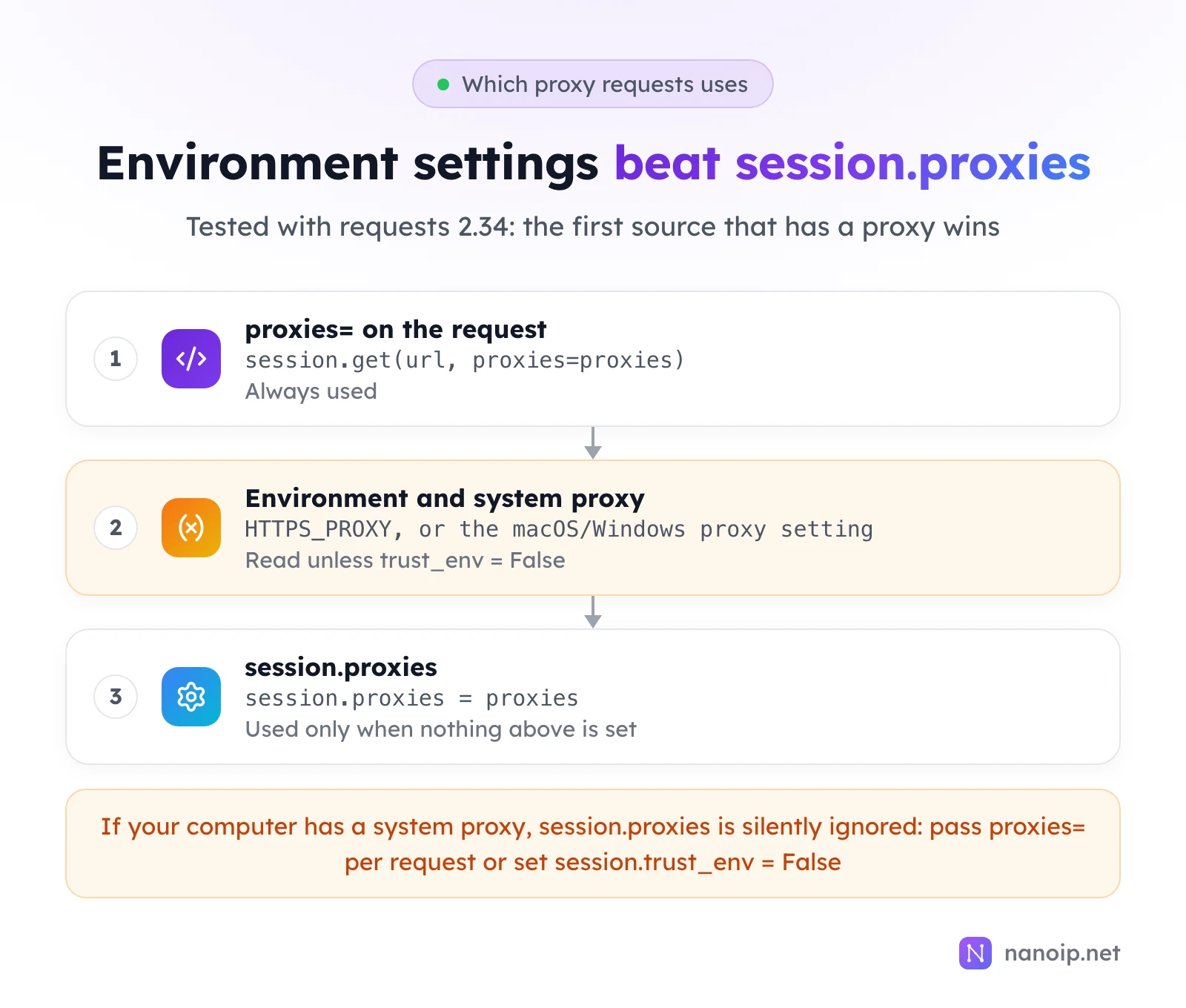
requests also reads proxies from the environment: the HTTPS_PROXY, HTTP_PROXY and NO_PROXY variables, and on macOS and Windows the system proxy setting. Those win over session.proxies. Our test machine had a system proxy enabled, and the session example above sent nothing through our test proxy at all, without any error. With HTTPS_PROXY pointed at a closed port, the same session failed, while a request with proxies= passed directly still used the right proxy.
Two ways to make a session use your proxy no matter what the computer is set to:
session.get(url, proxies=proxies, timeout=15)   # pass proxies= on every request
session.trust_env = False                       # or ignore environment and system proxies
trust_env = False also stops the session from reading .netrc credentials and the REQUESTS_CA_BUNDLE setting, so prefer the per-request argument when you rely on either.
Trap 2: a Session keeps one connection, and one IP
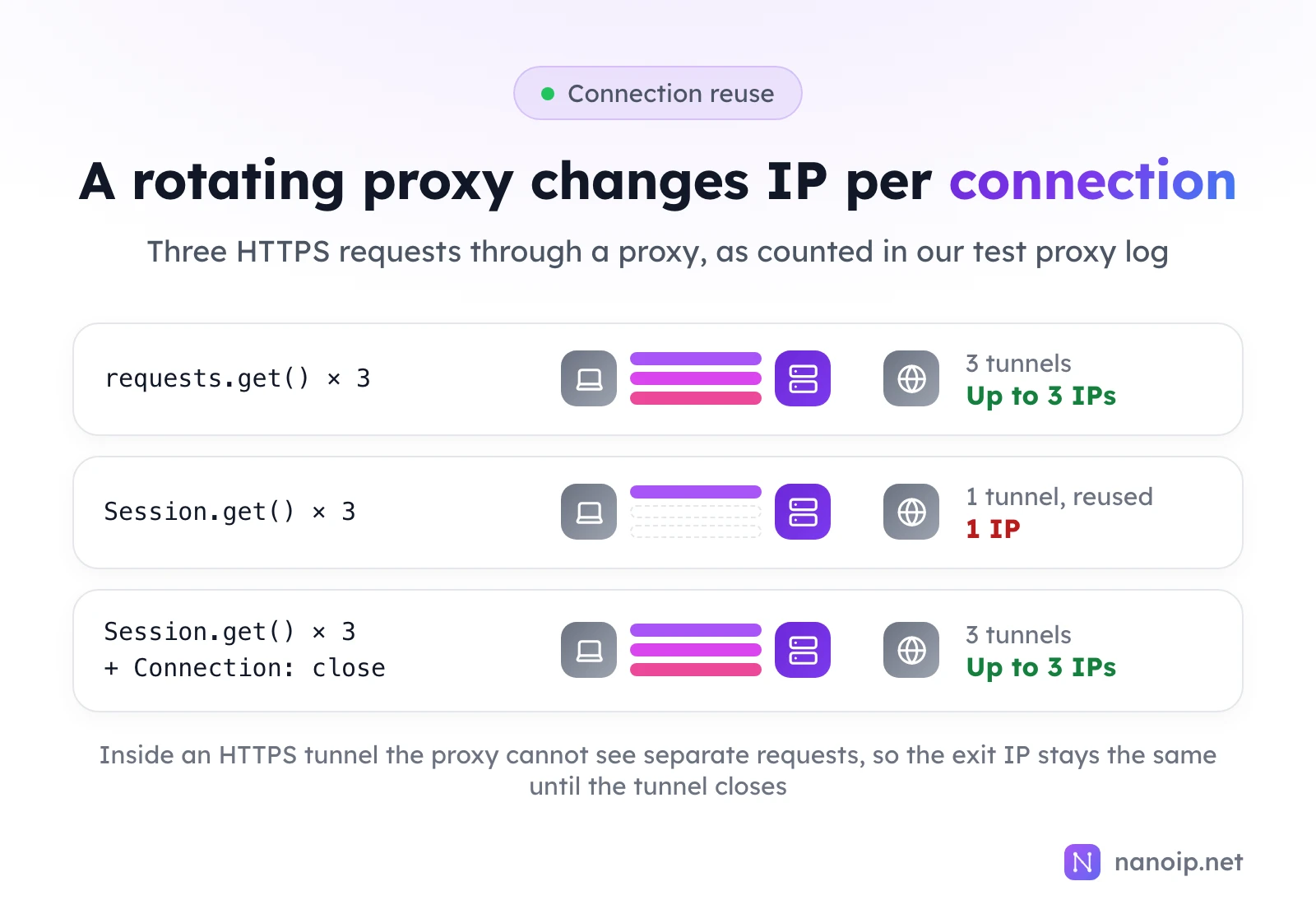
For an https:// site, requests asks the proxy for a tunnel and sends the request inside it. A Session keeps that tunnel open and reuses it: our test proxy logged one tunnel for three session.get() calls, and three tunnels for three plain requests.get() calls. Inside a tunnel the proxy only sees encrypted bytes, not separate requests, so a rotating proxy can only give you a new IP when a new connection opens.
- Want a new IP per request on a rotating route? Use
requests.get()without a session, or addsession.headers["Connection"] = "close"so each request opens its own tunnel (three tunnels in our test). - Want one IP for a whole task, such as a sign-in followed by several pages? Use a sticky route. A reused connection helps, but a sticky session keeps the IP even when connections are reopened.
Rotating vs sticky sessions explains how each session type behaves.
SOCKS5 proxies
import requests

proxy = "socks5h://USERNAME:PASSWORD@HOST:PORT"
proxies = {"http": proxy, "https": proxy}

print(requests.get("https://ipinfo.io/ip", proxies=proxies, timeout=15).text.strip())
This needs requests[socks]. Use socks5h://: our test proxy received the hostname, so the DNS lookup happened on the proxy's side. With socks5://, your machine looks up the address first. SOCKS5 vs HTTP proxies covers when SOCKS5 is worth it.
Handle proxy errors
import requests

proxy = "http://USERNAME:PASSWORD@HOST:PORT"
proxies = {"http": proxy, "https": proxy}

try:
    response = requests.get("https://ipinfo.io/json", proxies=proxies, timeout=(5, 20))
    response.raise_for_status()
    print(response.json()["ip"])
except requests.exceptions.ProxyError as error:
    print("Proxy refused or unreachable:", error)
except requests.exceptions.ConnectTimeout:
    print("Timed out connecting to the proxy")
except requests.exceptions.HTTPError as error:
    print("The website answered with an error:", error.response.status_code)
timeout=(5, 20) allows 5 seconds to connect and 20 to read. ProxyError covers both a wrong login and a proxy you cannot reach; the message underneath says which. With a wrong password, ours ended in:
ProxyError('Unable to connect to proxy', OSError('Tunnel connection failed: 407 Proxy Authentication Required'))With a closed port:
ProxyError('Unable to connect to proxy', NewConnectionError("… Failed to establish a new connection: [Errno 61] Connection refused"))How to fix proxy error 407 and proxy not working go through the causes.
httpx and aiohttp
Two other popular clients, both tested through the same proxy.
httpx takes a single proxy argument (the older proxies argument is gone in httpx 0.28):
import httpx

proxy = "http://USERNAME:PASSWORD@HOST:PORT"

with httpx.Client(proxy=proxy, timeout=15) as client:
    print(client.get("https://ipinfo.io/ip").text.strip())
aiohttp takes the proxy per request. In aiohttp 3.14, proxy_auth and BasicAuth print deprecation warnings; send the login as a header instead:
import asyncio

import aiohttp

PROXY = "http://HOST:PORT"
PROXY_HEADERS = {"Proxy-Authorization": aiohttp.encode_basic_auth("USERNAME", "PASSWORD")}


async def main():
    async with aiohttp.ClientSession() as session:
        async with session.get("https://ipinfo.io/ip", proxy=PROXY, proxy_headers=PROXY_HEADERS) as response:
            print((await response.text()).strip())


asyncio.run(main())
Using NanoIP proxies in Python
- Residential and mobile:
proxy = "https://USERNAME:PASSWORD@gateway.nanoip.net:1111", with the login of a route from Dynamic Routes. Choose rotating or sticky when you generate the route, and mind trap 2 above. Large jobs over many pages are what web scraping with residential IPs is for. - ISP:
http://USERNAME:PASSWORD@HOST:PORTwith the IP's own host and port, orsocks5h://with the same login. The IP stays the same for the whole plan.
NanoIP authenticates by username and password only, so the scripts work unchanged from any server or laptop. To check a proxy before a long run, see how to use curl with a proxy.
Frequently asked questions
Does requests use the proxy for redirects?
Yes. Redirects are followed through the same proxy settings as the first request.
How do I use a different proxy for each request?
Pass a different proxies dictionary on each call. That is also the most reliable way, since a per-request argument wins over every other setting.
Why is my proxy ignored?
Usually one of three things: the "https" key is missing, session.proxies is being overridden by an environment or system proxy, or the host is listed in NO_PROXY. Pass proxies= on the request to rule out all three.