
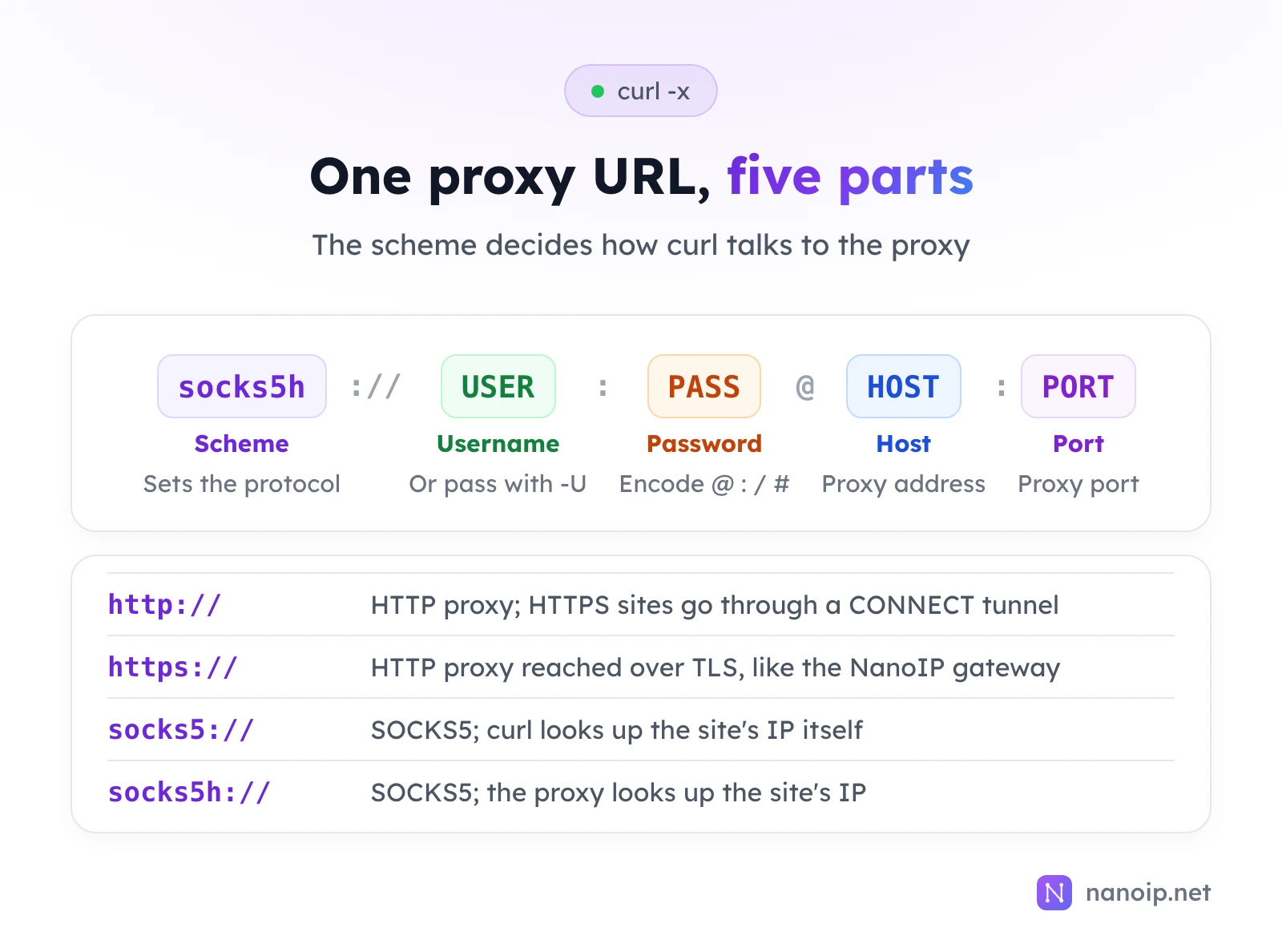
To send a curl request through a proxy, add -x with the proxy's address and -U with its username and password: curl -x http://HOST:PORT -U "USERNAME:PASSWORD" https://example.com. The scheme in front of the address sets the protocol: http:// or https:// for an HTTP proxy, socks5h:// for a SOCKS5 proxy that also looks up the site's address. curl can also take the proxy from environment variables or a config file, and -v shows exactly what happens between curl and the proxy.
The basic command
curl -x http://HOST:PORT -U "USERNAME:PASSWORD" https://example.com-x(long form--proxy) is the proxy address.-U(long form--proxy-user) is the proxy login. Quote it if the password has characters your shell treats specially.
To see which IP the website sees, request an IP lookup service instead of a normal page. https://ipinfo.io/ip prints the exit IP alone, and https://ipinfo.io/json adds the country, city and network:
curl -x http://HOST:PORT -U "USERNAME:PASSWORD" https://ipinfo.io/jsonLogin in the URL vs -U
You can also put the login in the proxy URL: -x http://USERNAME:PASSWORD@HOST:PORT. That works until the password contains @, :, / or #, which split the URL in the wrong place. Encode them (@ is %40, : is %3A). In our test, the password p@ss:word worked as p%40ss%3Aword in the URL and unchanged with -U:
curl -x "http://user:p%40ss%3Aword@127.0.0.1:28181" https://example.com
curl -x http://127.0.0.1:28181 -U "user:p@ss:word" https://example.com
Passing the login with -U avoids encoding altogether, which is why we use it in the rest of this guide.
HTTP, HTTPS and SOCKS5 proxies
| Scheme | Proxy type | What curl does |
|---|---|---|
http:// | HTTP proxy | Sends CONNECT to open a tunnel for HTTPS sites, or the whole request for http:// sites |
https:// | HTTP proxy over TLS | Same, but the connection to the proxy is encrypted first |
socks5:// | SOCKS5 | Looks up the site's address itself, then asks the proxy to connect to that IP |
socks5h:// | SOCKS5 | Sends the site's hostname and lets the proxy look it up |
The flags --socks5 and --socks5-hostname do the same as the socks5:// and socks5h:// schemes. If the scheme does not match what the proxy speaks, the request fails without a clear message: in our test, http:// against a SOCKS5 port ended with Recv failure: Connection reset by peer, and socks5h:// or https:// against a plain HTTP proxy hung until curl's time limit.
The SOCKS5 vs HTTP proxy guide explains when to use each protocol.
socks5 or socks5h?
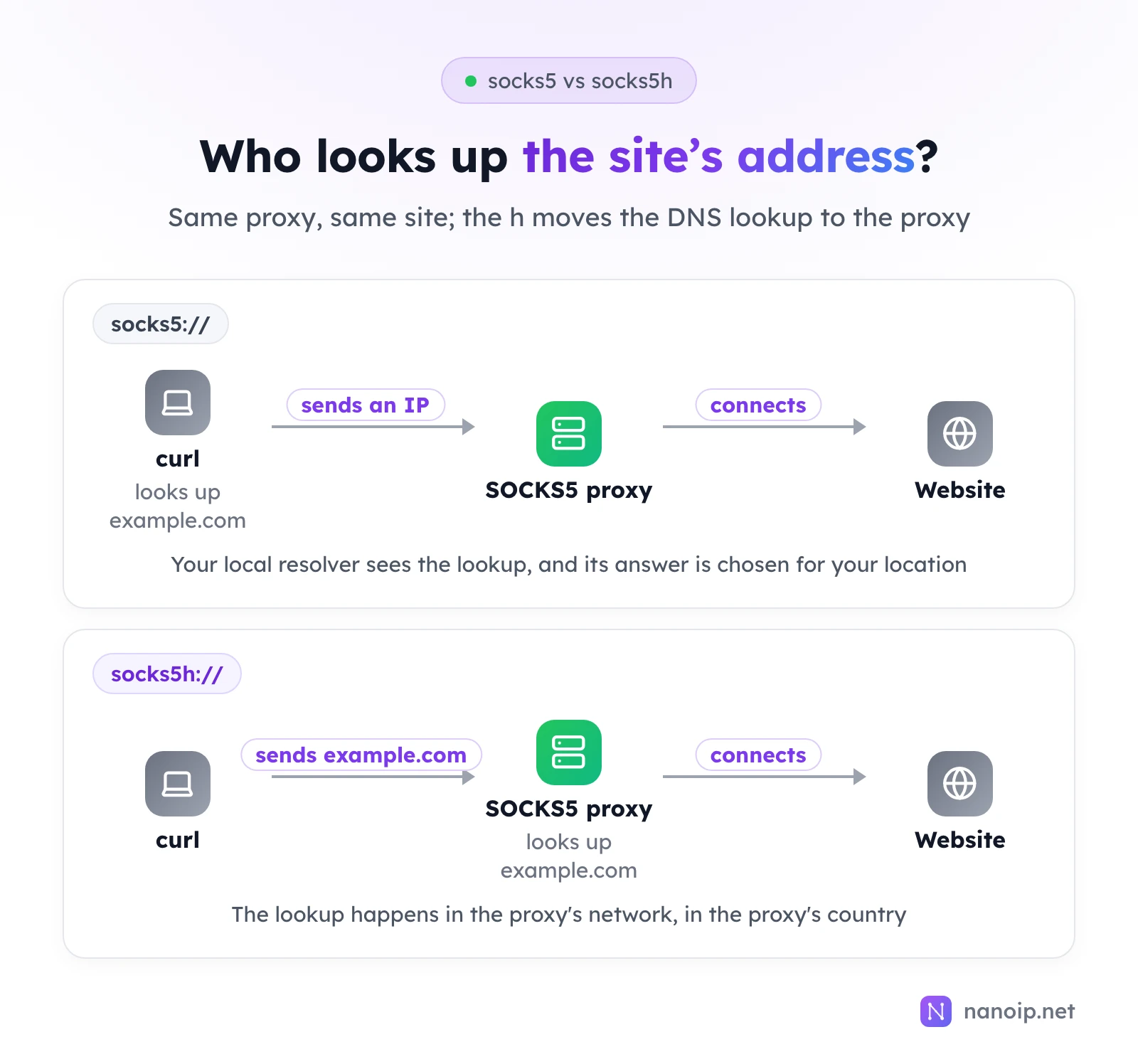
Use socks5h:// unless you have a reason not to. Our test proxy logged what it received for the same request to example.com:
socks5://   → the proxy received an IP address (curl had looked it up locally)
socks5h://  → the proxy received "example.com" (the proxy looked it up)
A local lookup is answered by your own DNS resolver, which can return servers chosen for your location rather than the proxy's, and it shows your resolver every site you visit. With socks5h://, the lookup happens on the proxy's side.
Setting the proxy without -x
Environment variables
curl reads these variables when no -x is given:
| Variable | Used for | Notes from our test |
|---|---|---|
http_proxy | http:// URLs | Lowercase only: curl ignored HTTP_PROXY and connected directly |
https_proxy or HTTPS_PROXY | https:// URLs | Both spellings worked |
ALL_PROXY | Every URL without a more specific variable | Worked with a socks5h:// proxy |
NO_PROXY | Hosts that skip the proxy | Comma-separated list; * means every host |
export https_proxy="http://USERNAME:PASSWORD@HOST:PORT"
curl https://example.com
The login has to go in the URL here, so encode special characters. Other programs read these variables too, so export affects everything you run in that shell; set them on the command itself (https_proxy=… curl …) to limit them to one request.
A config file
curl reads ~/.curlrc on start-up (_curlrc in your application data folder on Windows), and -K FILE reads another file. The same options work there without the dashes:
proxy = "http://HOST:PORT"
proxy-user = "USERNAME:PASSWORD"
Which setting wins
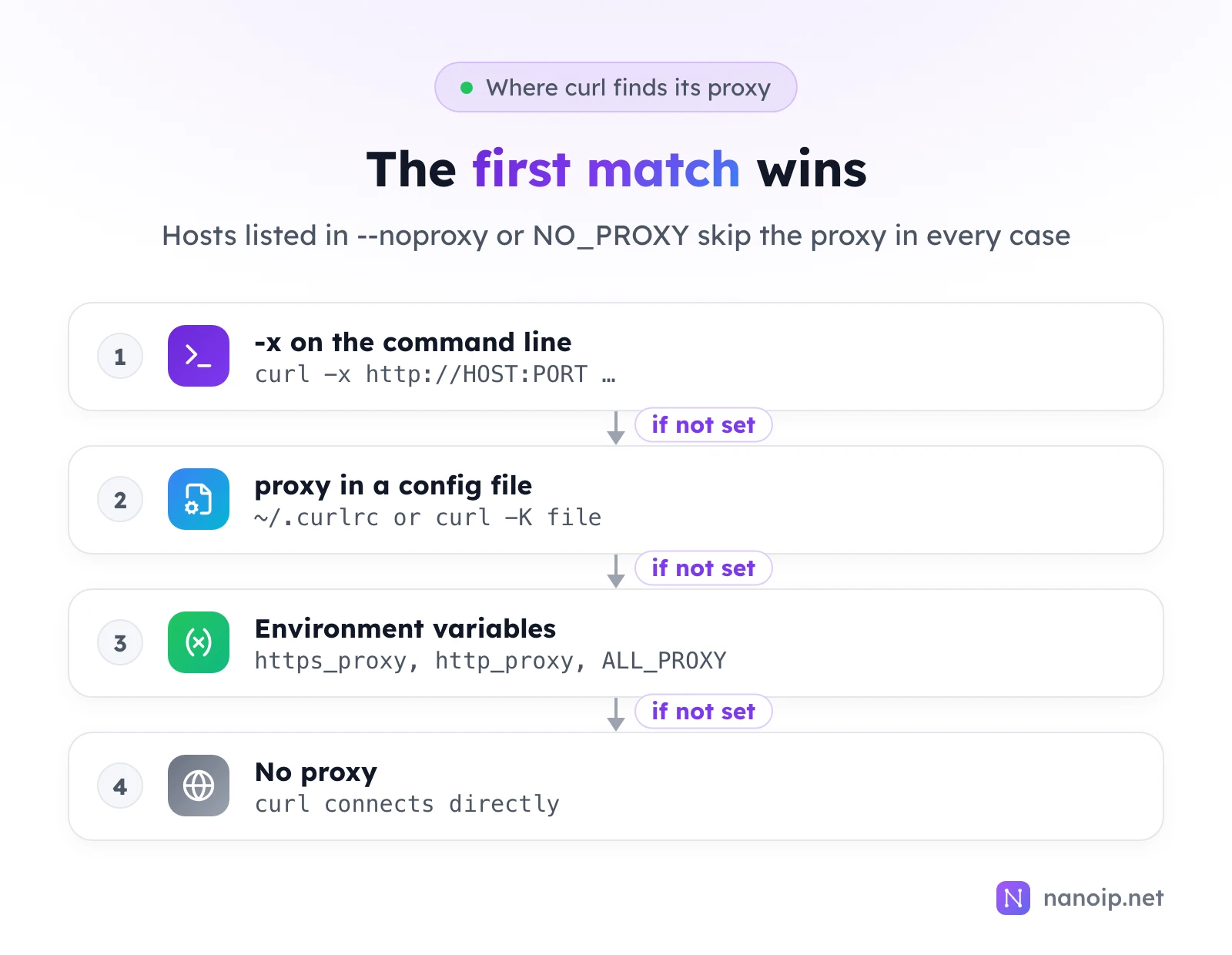
In our tests, -x beat a wrong https_proxy, and a config file beat it too. Between -x and -K, the one that comes later on the command line wins, so ~/.curlrc, which curl reads first, never overrides your -x. To skip the proxy for one request, use --noproxy '*'; to ignore ~/.curlrc, start the command with -q.
Debugging a proxy connection
See the conversation with -v
-v prints every step. This is the start of a working request through our test proxy:
* Connected to 127.0.0.1 (127.0.0.1) port 28181
* Proxy auth using Basic with user 'user'
* Establish HTTP proxy tunnel to example.com:443
> CONNECT example.com:443 HTTP/1.1
> Proxy-Authorization: Basic dXNlcjpwQHNzOndvcmQ=
< HTTP/1.1 200 Connection established
* CONNECT tunnel established, response 200
Lines with > are what curl sent to the proxy, lines with < are the proxy's answer. If the tunnel is not established, the problem is between curl and the proxy, not with the website. Note that Proxy-Authorization is only Base64, not encryption: don't paste -v output with real credentials into tickets or chats.
-I (headers only) through a proxy prints the proxy's HTTP/1.1 200 Connection established first, then the website's own headers, so the first status line you see is not the site's.
Time each step with -w
curl -x http://HOST:PORT -U "USERNAME:PASSWORD" -o /dev/null -s \
  -w 'connect: %{time_connect}s  tls: %{time_appconnect}s  total: %{time_total}s\n' \
  https://example.com
time_connect is the connection to the proxy; the gap between it and time_appconnect is the tunnel plus the TLS handshake with the site. A slow time_connect points at the route to the proxy; a fast connect with a slow total points at the exit or the site.
Errors you will see
The messages for codes 7, 56, 97 and 28 are copied from our tests; code 5 is described in curl's documentation.
| Exit code | Message | Usual cause |
|---|---|---|
| 7 | Failed to connect to 127.0.0.1 port 1 after 0 ms: Couldn't connect to server | Wrong port, or the proxy is not reachable from your network |
| 56 | CONNECT tunnel failed, response 407 | Missing or wrong proxy login; see how to fix proxy error 407 |
| 56 | Recv failure: Connection reset by peer | Wrong scheme, such as http:// against a SOCKS5 port |
| 97 | User was rejected by the SOCKS5 server (1 1). | Wrong SOCKS5 username or password |
| 28 | Connection timed out after 8006 milliseconds | Proxy unreachable, or a scheme the proxy does not speak |
| 5 | Could not resolve proxy | The proxy hostname is mistyped |
Using curl with NanoIP proxies
Residential and mobile proxies connect through the HTTPS gateway, with the username and password of a route generated in Dynamic Routes:
curl -x https://gateway.nanoip.net:1111 -U "USERNAME:PASSWORD" https://ipinfo.io/jsonEach ISP proxy IP has its own host and port and accepts both HTTP and SOCKS5 with the same login:
curl -x http://HOST:PORT -U "USERNAME:PASSWORD" https://ipinfo.io/json
curl -x socks5h://HOST:PORT -U "USERNAME:PASSWORD" https://ipinfo.io/json
Run the residential command a few times on a rotating route and the IP changes each time; on a sticky route or an ISP IP it stays the same. NanoIP authenticates by username and password only, so the commands work the same from any network. The getting started guide shows where to find each value, and rotating vs sticky sessions explains the session types.
Frequently asked questions
Does curl use my system proxy settings?
No. curl ignores the proxy configured in macOS or Windows network settings. It only uses -x, its config file and the environment variables above.
How do I make curl skip the proxy for some hosts?
Add --noproxy with a comma-separated list, for example --noproxy localhost,example.com, or set NO_PROXY. --noproxy '*' skips the proxy for everything.
Why does my request work in the browser but not in curl?
The browser may be using a different proxy, or none. Check which variables are set with env | grep -i proxy, then pass the proxy explicitly with -x and -U and read the -v output.