
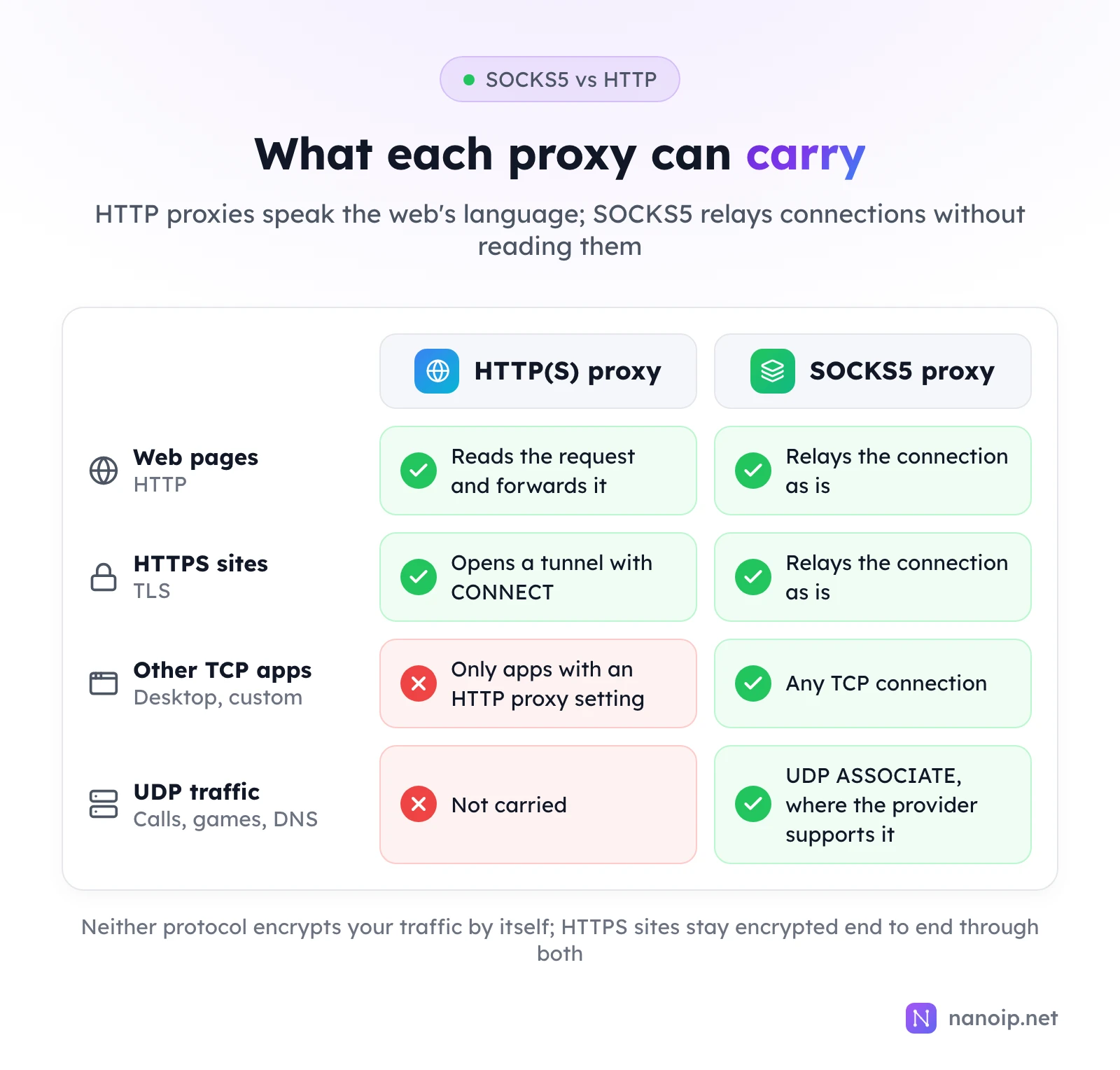
An HTTP proxy understands web traffic: it reads plain HTTP requests and opens tunnels for HTTPS sites. A SOCKS5 proxy works one level lower and relays any TCP connection without reading it, and it can also carry UDP. Use HTTP(S) for browsers, fingerprint browsers, scrapers and API clients, which all support it; use SOCKS5 for desktop apps without an HTTP proxy setting and for traffic that needs UDP, such as calls, games and DNS. NanoIP ISP proxies support both on every IP with the same username and password.
How an HTTP proxy works
An HTTP proxy speaks HTTP, the protocol of the web. What it does depends on the site:
- Plain
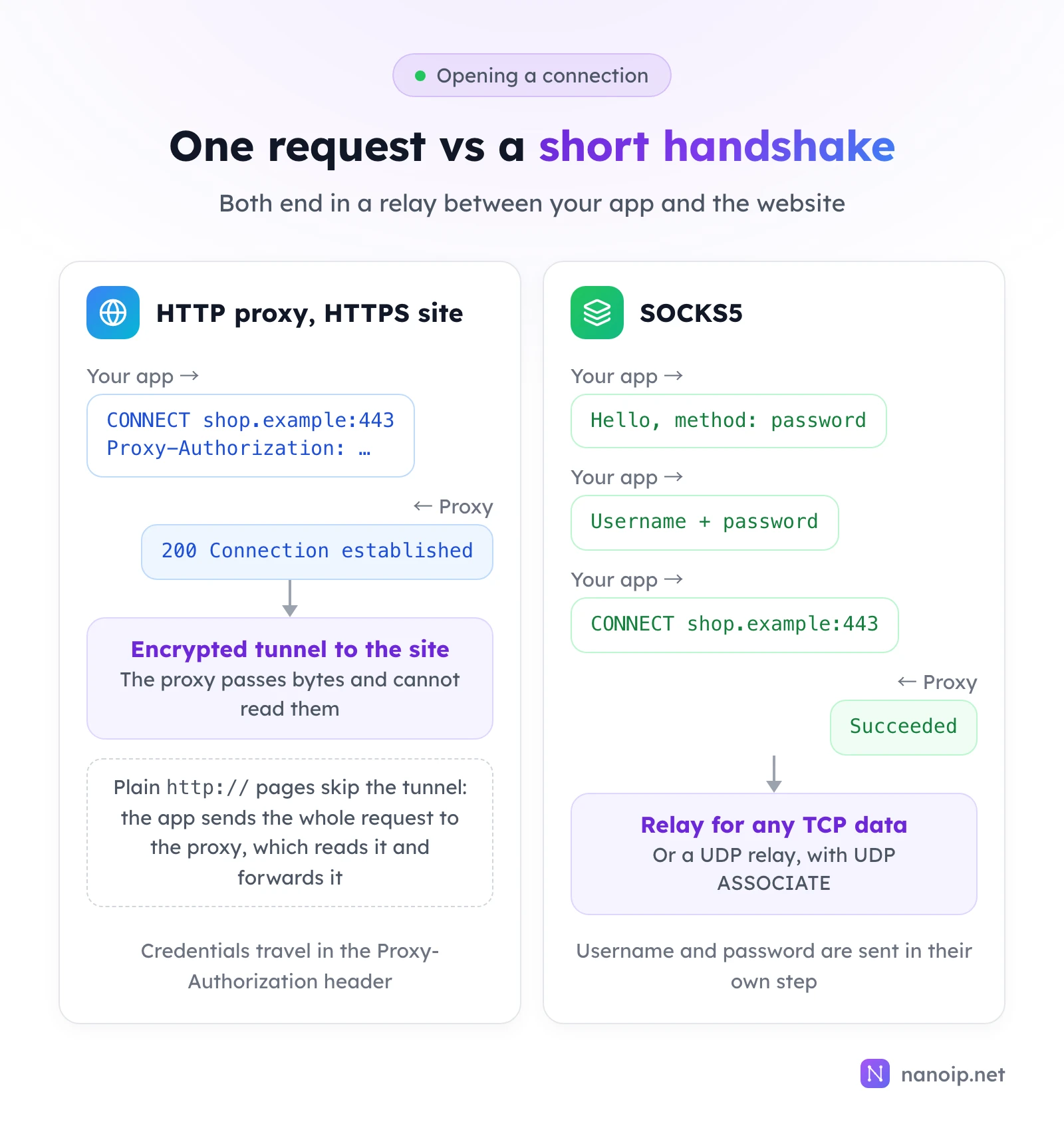
http://sites: your app sends the whole request to the proxy, including the full address, and the proxy reads it and forwards it to the site. Because it reads the request, an HTTP proxy can also cache, filter or add headers, which is how corporate and school proxies work. https://sites: your app asks the proxy to open a tunnel with aCONNECTrequest naming the site and port. The proxy connects, replies200 Connection established, and from then on passes encrypted bytes it cannot read.
Today almost every site is HTTPS, so in practice an HTTP proxy is a tunnel builder. Your credentials travel in a Proxy-Authorization header on the first request.
HTTP proxy vs HTTPS proxy
"HTTPS proxy" means two different things, and providers use both:
- An HTTP proxy that tunnels HTTPS sites, which is every modern HTTP proxy.
- A proxy you reach over an encrypted connection, so the connection to the proxy itself, including your username and password, is protected with TLS before any tunnel opens.
NanoIP's residential and mobile gateway is the second kind: you connect to https://gateway.nanoip.net:1111, and everything between your device and the gateway is encrypted.
How a SOCKS5 proxy works
SOCKS5 does not care what the traffic is. Your app and the proxy run a short handshake: the app offers its login methods, sends a username and password, and names the host and port it wants. The proxy opens that connection and relays bytes in both directions.
Two features make SOCKS5 the more general protocol:
- Any TCP connection. Email clients, desktop apps, game launchers and custom software can use it, as long as they can be pointed at a SOCKS5 proxy.
- UDP. The
UDP ASSOCIATEcommand sets up a relay for UDP packets, which HTTP proxies cannot carry at all. Not every provider enables it; see what a UDP proxy is for how it works and when you need it.
Where DNS is resolved
With SOCKS5, your app can either look up the site's address itself and send the proxy an IP, or send the hostname and let the proxy look it up. In curl and Python, socks5:// resolves locally and socks5h:// lets the proxy resolve. Use socks5h:// when the lookup should happen in the proxy's country too: a local lookup can return servers chosen for your own location, and it shows your local DNS resolver which sites you visit. HTTP proxies always receive the hostname, so the proxy resolves it.
SOCKS5 vs HTTP proxy compared
| HTTP(S) proxy | SOCKS5 proxy | |
|---|---|---|
| Works at | Application level: understands HTTP | Session level: relays connections |
| Traffic | Web traffic: HTTP requests and HTTPS tunnels | Any TCP connection, plus UDP where supported |
| UDP (calls, games, DNS, HTTP/3) | No | Yes, with UDP ASSOCIATE |
| DNS lookups | Done by the proxy | By your app or the proxy (socks5h) |
| Login | Proxy-Authorization header | Username and password step in the handshake |
| Encryption | None by itself; an HTTPS proxy encrypts the hop to the proxy | None by itself |
| App support | Almost every browser, tool and library | Most tools; some need an extra package |
Is SOCKS5 faster?
Slightly, in theory: it does not parse requests, so there is less work per connection. In practice the difference is lost next to the distance between you, the proxy and the site, and the quality of the exit IP. Pick the protocol your app and traffic need, not the one that promises speed.
Is SOCKS5 more secure?
No. Neither protocol encrypts your traffic, and a SOCKS5 username and password are sent without encryption. What protects your data is HTTPS on the site itself, which stays encrypted end to end through either kind of proxy. If you want the connection to the proxy encrypted as well, use an HTTPS proxy such as the NanoIP gateway.
Which one should you use?
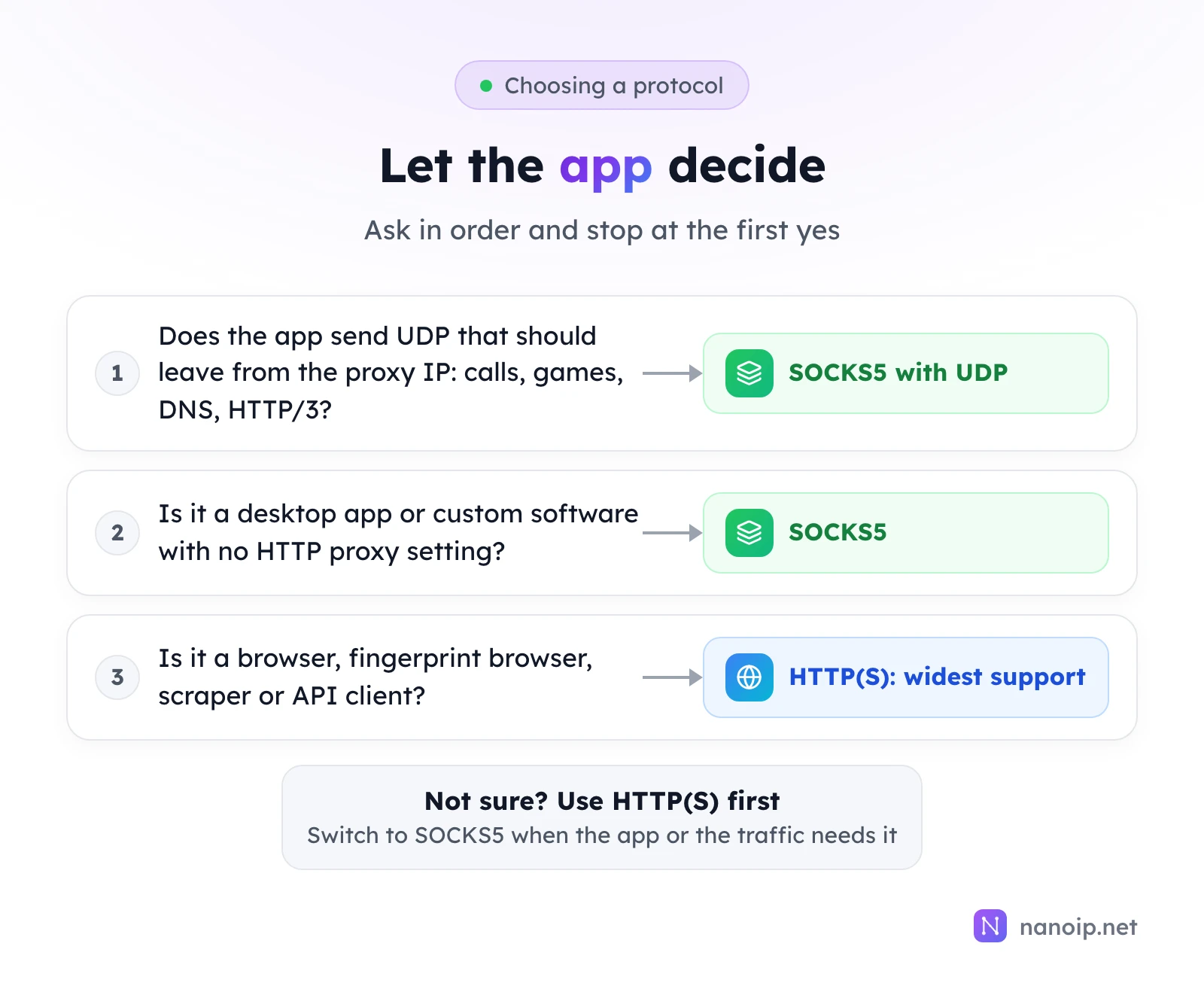
- Choose HTTP(S) for browsers, fingerprint browsers, scraping libraries, automation frameworks and API clients. Every one of them supports it, and for web traffic it does everything you need.
- Choose SOCKS5 when an app has no HTTP proxy setting, when it uses protocols other than HTTP, or when you want the proxy to resolve DNS.
- Choose SOCKS5 with UDP for voice and video calls, online games, WebRTC and anything else that sends UDP, so that traffic leaves from the proxy IP too.
Which protocols NanoIP proxies support
| Product | How you connect | Protocols |
|---|---|---|
| ISP proxies | Each IP has its own host and port | HTTP, HTTPS and SOCKS5, UDP over SOCKS5 |
| Residential proxies | HTTPS gateway gateway.nanoip.net:1111 | HTTPS |
| Mobile proxies | HTTPS gateway gateway.nanoip.net:1111 | HTTPS |
Every ISP IP accepts all three protocols with the same username and password, so you can use HTTP in a fingerprint browser and SOCKS5 in a desktop app on the same IP. Authentication is always by username and password; there is no IP whitelist. The getting started guide shows where to find each IP's details.
Writing the proxy address
Most tools have a protocol drop-down next to the host, port, username and password fields. Libraries and command-line tools take the same details as one URL, where the scheme sets the protocol:
http://USERNAME:PASSWORD@HOST:PORT
socks5h://USERNAME:PASSWORD@HOST:PORT
https://USERNAME:PASSWORD@gateway.nanoip.net:1111
The first two lines are an ISP IP over HTTP and over SOCKS5, with the proxy resolving DNS. The third is the residential and mobile gateway. Python's requests needs the requests[socks] extra before it accepts socks5h:// addresses. If your password contains characters such as @ or :, encode them in the URL (%40, %3A), or the tool will split the address in the wrong place.
Frequently asked questions
Can one proxy IP support both HTTP and SOCKS5?
Yes, if the provider sets it up that way. Every NanoIP ISP IP accepts HTTP, HTTPS and SOCKS5 with the same credentials; some providers sell the protocols separately or ask you to choose one per IP when you buy.
Do I need SOCKS5 for a fingerprint browser?
No. Fingerprint browsers support HTTP, HTTPS and SOCKS5 proxies. Use HTTP(S) unless you want calls, WebRTC or other UDP traffic in that profile to go through the proxy as well; then use SOCKS5 on an IP that supports UDP.
Is SOCKS4 still used?
Rarely. SOCKS4 has no username and password login and no UDP, so proxy providers offer SOCKS5 instead.