
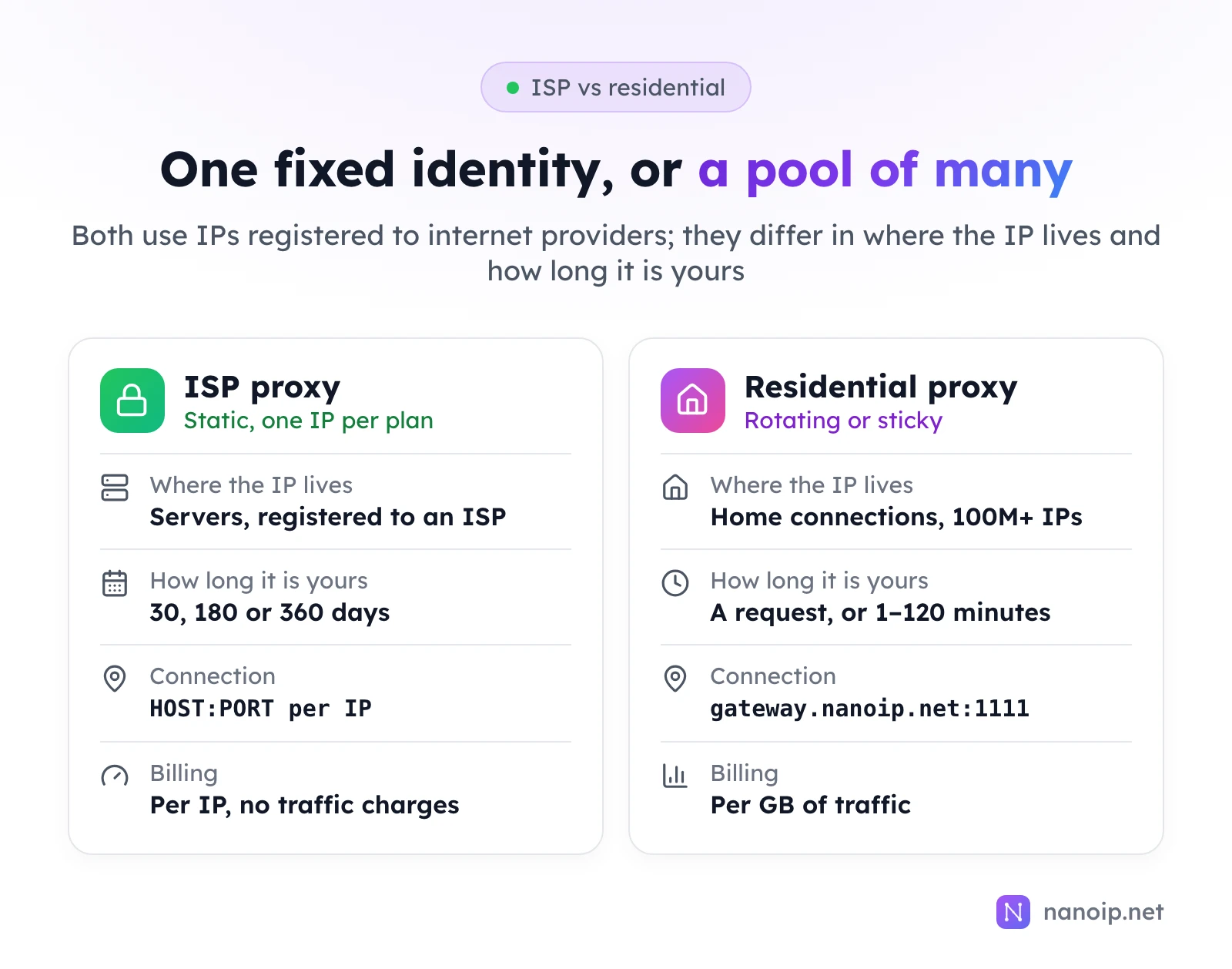
Choose an ISP proxy when one network identity has to stay the same for days or weeks: an account you sign in to daily, a store dashboard or a browser profile you keep coming back to. Choose residential proxies when you need many different IPs in many locations for independent requests, such as collecting public data or checking what a page shows in another country. Both use IPs registered to internet providers; the difference is that an ISP IP is yours alone for the whole plan, while residential IPs are borrowed from a large pool for a request or a session.
What is a residential proxy?
A residential proxy routes your traffic through an IP address that an internet provider assigned to a home connection. The pool is large and spread across many countries and cities, so residential proxies are built for variety: you pick a country, and often a city, and the gateway hands out IPs from that location.
With NanoIP residential proxies you choose how the IP behaves:
- Rotating session: a new exit IP for each new connection. Best for large batches of independent requests.
- Sticky session: one exit IP for a time you choose, from 1 to 120 minutes, long enough to finish a login, a multi-step form or a checkout.
A sticky session is not a permanent IP: when it ends, the IP goes back to the pool. Rotating vs sticky sessions covers the difference in detail.
What is an ISP proxy?
An ISP proxy is a static IP registered to an internet provider but hosted on server infrastructure instead of in someone's home. You get one fixed address that stays yours for the whole plan, and the connection does not depend on a home device being online. In the NanoIP dashboard these are listed as Static Residential proxies, which is why you will see both names for the same product.
Every NanoIP ISP IP is dedicated: nobody else uses it during your plan, and renewing keeps the same IP. See ISP proxies for locations, and dedicated vs shared proxies for why dedication matters.
ISP vs residential proxies at a glance
| Residential proxies | ISP proxies | |
|---|---|---|
| Where the IP lives | Real home connections | Servers, with the IP registered to an internet provider |
| IP behaviour | Rotates, or holds a sticky session of 1 to 120 minutes | One fixed IP for the whole plan |
| Who uses the IP | A shared pool, borrowed per request or session | Only you, for the plan |
| Connection | HTTPS gateway gateway.nanoip.net:1111 | Each IP's own host and port, HTTP(S) or SOCKS5 |
| Billing | Per GB, from $0.82/GB | Per IP, from $10.20/IP for 30 days, no traffic charges |
| Location choice | Country, often city, from 195+ countries | The country of each IP you buy |
| Best for | Public data collection, price and search checks, localized content | Accounts, stores, browser profiles, long sessions |
When to choose residential proxies
Residential proxies are the better fit when each request stands on its own and IP variety matters:
- Web scraping and other public data collection
- Price monitoring across regions and retailers
- Search result checks for SEO monitoring
- Ad display checks in different countries
- Viewing localized versions of a site from many locations
For these jobs a fixed IP is a limitation: you want a different address for each batch, and billing follows the traffic you actually use.
When to choose ISP proxies
ISP proxies are the better fit when the same identity has to come back again and again:
- Fingerprint browser profiles, with one IP per profile
- Account management for social media or e-commerce accounts you operate
- Store and ad account dashboards you open every day
- Long login sessions and long-running browser automation
Before buying, compare what the plans include, not only the price per IP: traffic, bandwidth, protocols, UDP and device limits. The guide to choosing ISP proxies lists what to check.
How the cost compares
The two products are priced on different things, so the cheaper option depends on how you use them:
- Residential costs follow traffic. Many light requests spread across many IPs stay inexpensive; heavy pages and media add up.
- ISP costs follow the number of IPs and how long you keep them. A handful of identities used every day is easy to budget for, whatever the traffic.
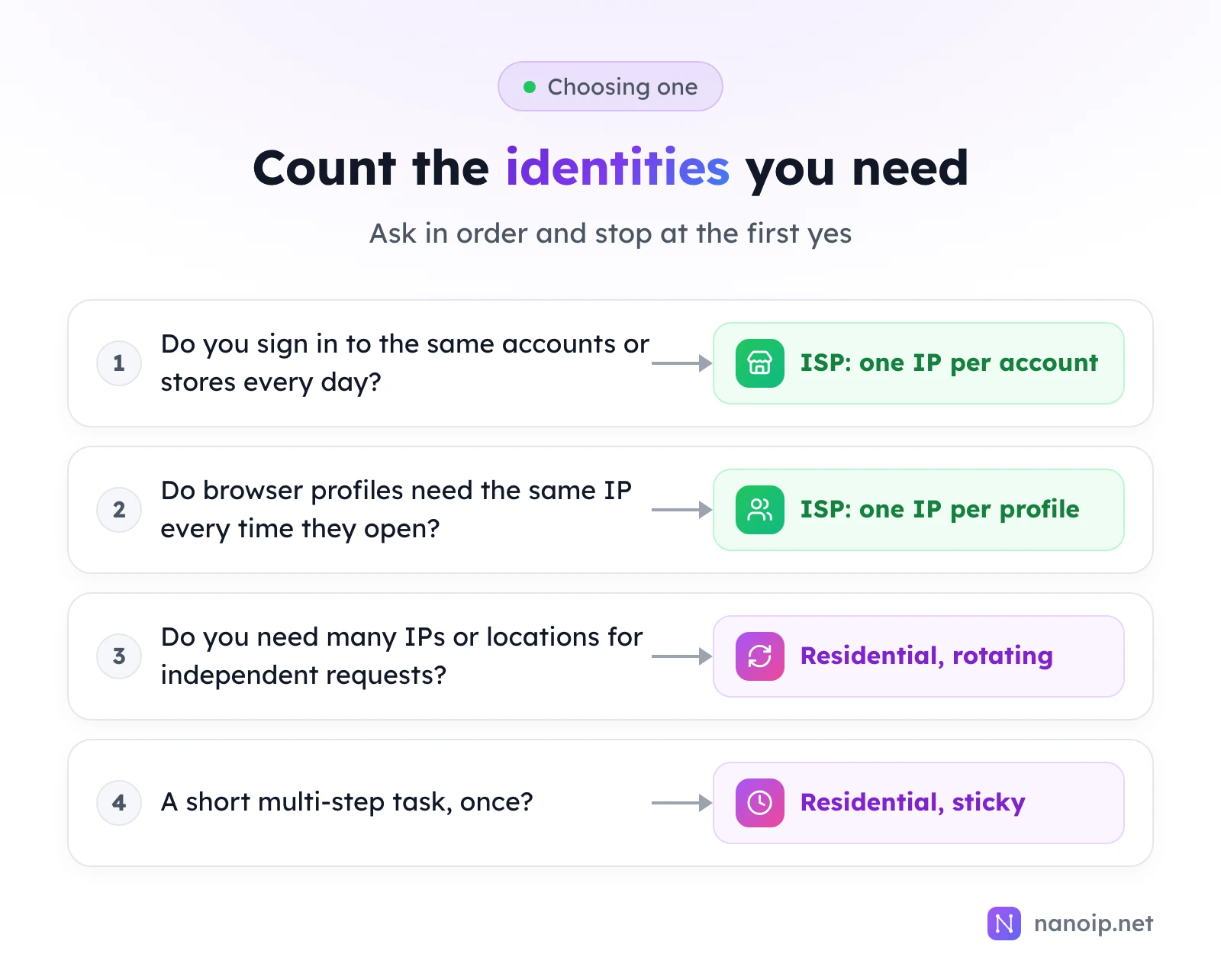
A practical rule: count how many stable identities you need. "A few, for weeks" points to ISP proxies; "as many as possible, briefly" points to residential. Per-GB vs per-IP pricing shows how to estimate your traffic, and current plans are on the pricing page.
Which one to choose
What about mobile proxies?
Mobile proxies route traffic through 4G and 5G carrier IPs and start from $1.20/GB. Choose them when the work needs a mobile carrier network, such as mobile ad checks or testing an app on a carrier connection. Mobile vs residential proxies compares the two.
Frequently asked questions
Is an ISP proxy the same as a static residential proxy?
Yes. Both names describe a static IP registered to an internet provider. NanoIP sells them as ISP proxies on the website and lists them as Static Residential in the dashboard.
Can I keep the same residential IP?
Only for the length of a sticky session, up to 120 minutes. Residential IPs come from a shared, changing pool, so they are not suited to keeping one address for days. Use an ISP proxy for that.
Can I use residential proxies in a fingerprint browser?
You can, with a sticky session, for short one-off tasks. For profiles you open again and again, a static ISP proxy is the usual choice, because the profile keeps the same IP every time.
Are ISP proxies faster than residential proxies?
They are usually more consistent, because they run on server connections rather than home lines that can go offline. For speed, the location of the exit IP relative to the site matters more than the proxy type.