
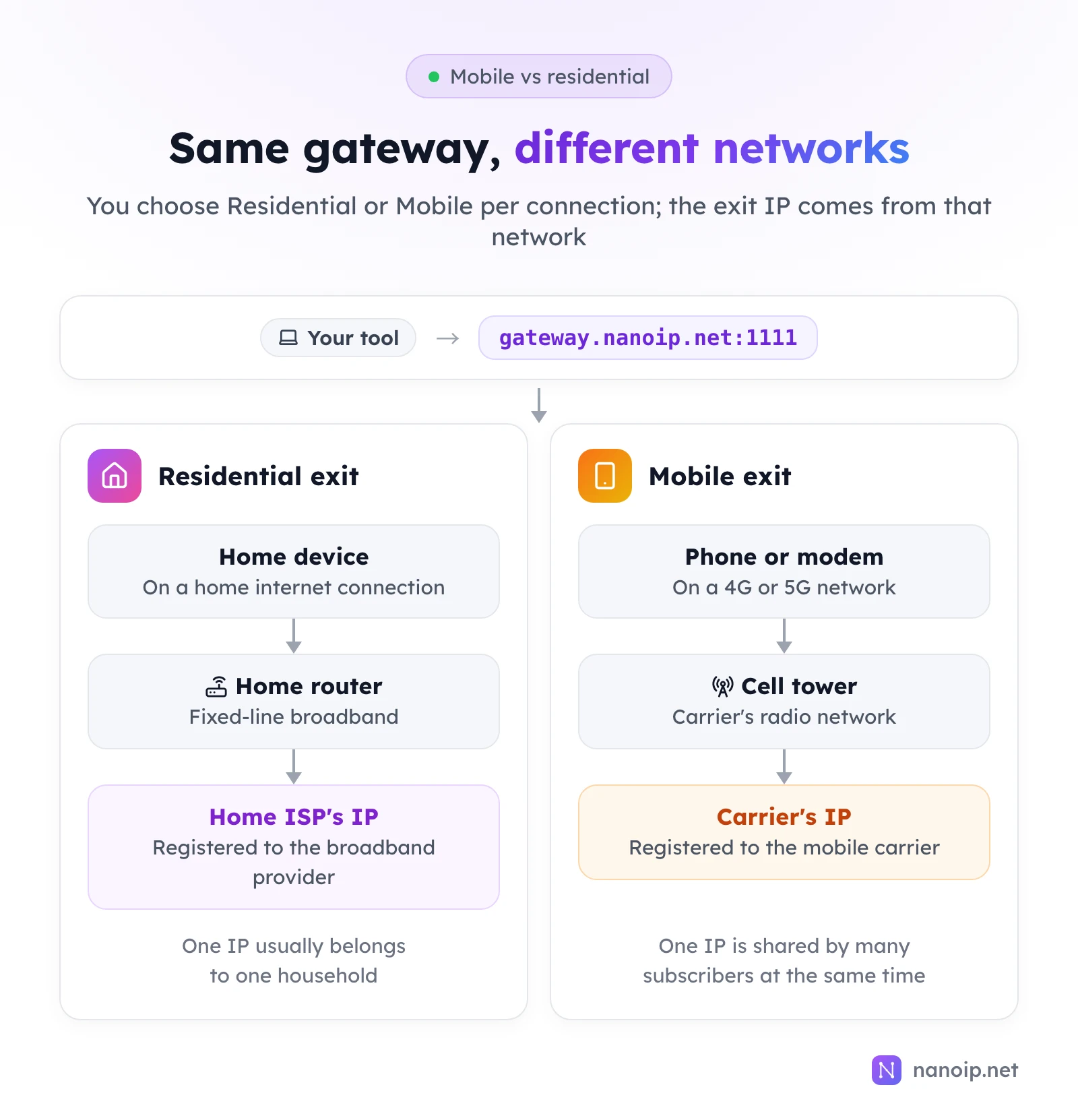
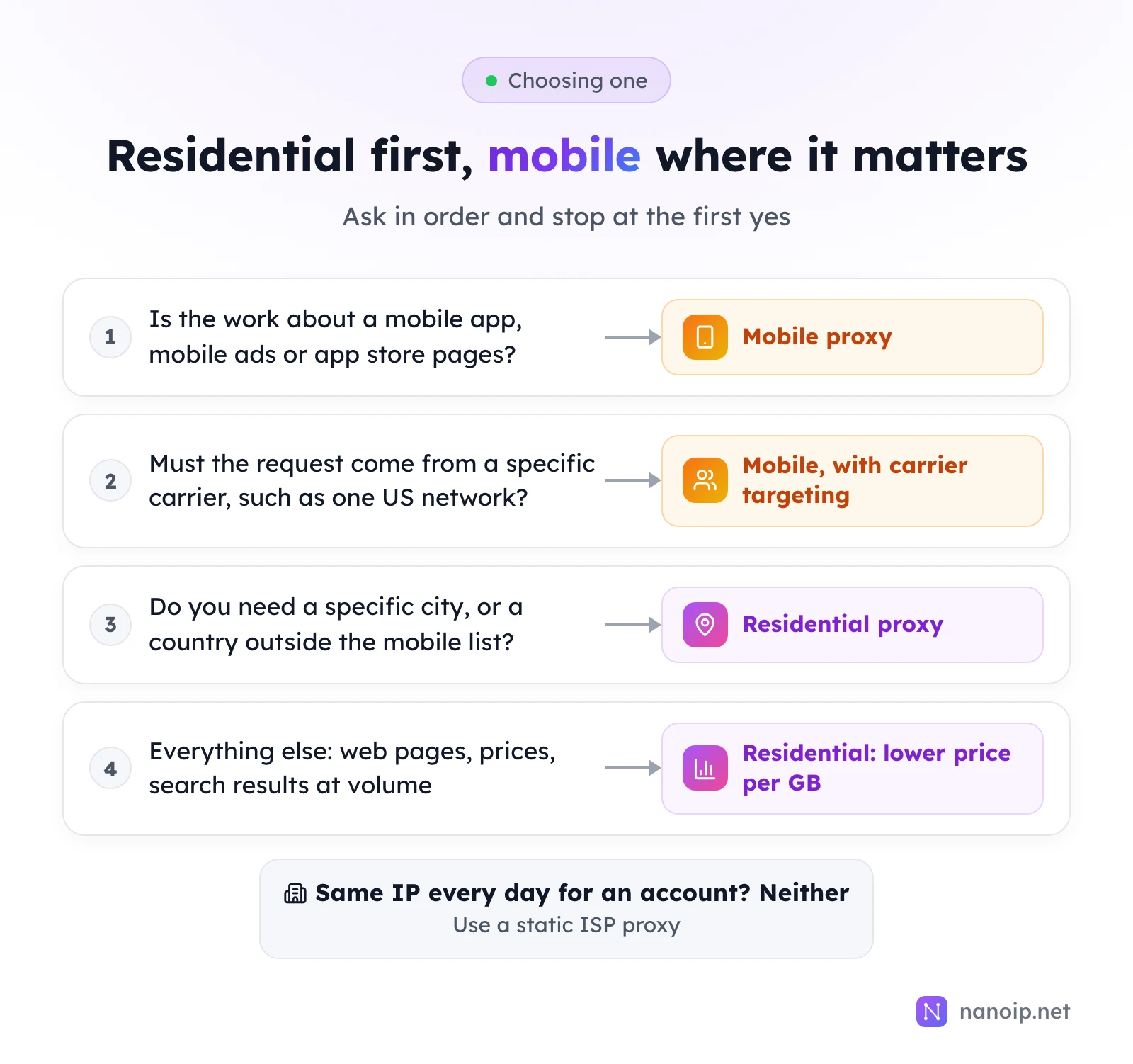
Mobile and residential proxies work the same way for you: both rotate through a pool of real-user IPs, both are billed per GB, and with NanoIP both connect through the same gateway. The difference is the network the exit IP comes from. Residential IPs belong to home broadband connections; mobile IPs belong to 4G and 5G carriers, where one IP is shared by many subscribers at once. Choose residential for most web work: it has the bigger pool, city targeting and a lower price per GB. Choose mobile when the work is about phones: mobile apps, mobile ads, app stores or a specific carrier.
Where the IPs come from
Residential proxies: home broadband
A residential IP is the address an internet service provider assigns to a home connection. Behind it there is usually one household: a few computers, phones and TVs on the same router. The IP is registered to the broadband provider, and IP databases list it as a consumer address in that provider's area, which is why residential IPs can be targeted down to the city.
Mobile proxies: carrier networks
A mobile IP is the address a mobile carrier gives to phones and modems on its 4G or 5G network. Carriers have far fewer IPv4 addresses than subscribers, so they put many devices behind each public IP at the same time and reassign addresses often. One mobile IP can stand for many real people in the same area, so sites are used to seeing a lot of different traffic behind it. That shared nature is what sets mobile proxies apart, and it is also why they cost more: the supply of real carrier connections is much smaller than the residential pool.
Mobile vs residential proxies at a glance
| Residential proxies | Mobile proxies | |
|---|---|---|
| Exit network | Home broadband ISPs | 4G and 5G mobile carriers |
| Pool | 100M+ IPs | 10M+ IPs, 50+ carriers |
| Countries | 195+ | 100+ |
| Targeting | Country, plus state and city in major markets | Country, plus carrier in supported markets |
| IP rotation | Every request, or sticky for 1 to 120 minutes | Every request or on an interval, or sticky; carriers also reassign IPs |
| Connection | HTTPS gateway gateway.nanoip.net:1111 | Same gateway |
| Billing | Per GB, from $0.82/GB | Per GB, from $1.20/GB |
| Packages | 1 GB to 500 GB, valid 30 to 360 days; 1 TB with no time limit | 1 GB to 500 GB, valid 30 to 360 days; 1 TB and 5 TB with no time limit |
| Typical work | Web data, price and SEO checks, ad checks, localized content | Mobile apps, mobile ads, app stores, social apps, carrier testing |
Prices and package sizes change; the pricing page has the current ones.
When to choose residential proxies
Residential proxies are the default for anything that happens on the web:
- Collecting public web data at volume, where cost per GB adds up: product pages, prices, reviews, search results. See web scraping.
- City-level work, such as checking local search results, store availability or localized prices in a specific city.
- Wide country coverage, when you need a country that the mobile pool does not cover.
- Ad and SEO checks on desktop, where the page should be seen from a household connection in the target market.
If the work does not depend on a mobile network, the lower price per GB and the larger pool make residential the better choice.
When to choose mobile proxies
Mobile proxies earn their price when the work is about phones:
- Mobile app testing: checking how an app's sign-up, content and features behave on a carrier network in each market.
- Mobile ad verification: confirming that mobile campaigns show the right creative and landing page to subscribers in a region. See ad verification.
- App store pages: checking rankings, listings and reviews as they appear to local phone users.
- Carrier-specific checks: content, offers or restrictions that differ by carrier, which only carrier targeting can show.
- Social apps used mainly on phones, where a carrier IP matches how the app is normally used.
Using both
Many teams use both from one account: residential for daily data collection and mobile for the mobile checks. Both draw on traffic packages bought separately per product, and both are set up the same way, so switching is a matter of choosing Residential or Mobile when you generate a connection in Dynamic Routes.
What neither one is for
Mobile and residential proxies rotate. Even a sticky session borrows an IP for a limited time, and carriers reassign mobile IPs on their own schedule. When an account, a seller center or an ad account should see the same IP every day for weeks, use a static ISP proxy instead: one IP registered to a local ISP, kept for the whole plan. The guide to rotating vs sticky sessions explains where each session type ends.
Setting up either one
- Buy a traffic package for the product on the proxy platform. Start with the 1 GB package if you are testing: it is valid for 30 days and runs on the same pool as the larger packages.
- Open Dynamic Routes, choose the proxy type (Residential or Mobile), the country and the session type, and click Generate.
- Enter the connection details in your tool, using HTTPS and the gateway
gateway.nanoip.net:1111with the generated username and password. - Open an IP lookup page through the proxy and check the country and network. A mobile exit shows the carrier as the organization; a residential exit shows a broadband provider.
Frequently asked questions
Are mobile proxies better than residential proxies?
Not in general. They are better for work that depends on a mobile network, and more expensive for everything else. For web pages viewed from a household connection, residential proxies do the same job for less per GB.
Why are mobile proxies more expensive?
The supply is smaller. Mobile IPs come from real carrier connections, of which there are far fewer than home broadband connections, so each GB costs more to provide.
Can I target a specific carrier?
Yes, in supported markets. Choose the country and the carrier when you set up the mobile proxy, for example to see how an offer appears to subscribers of one network.
Do mobile proxies have the same speed as residential ones?
Speed depends more on the exit location and the target site than on the network type. Choose an exit country close to the site you are working with, and test with the 1 GB package before buying more.