
A rotating proxy sends every request from a different IP; a sticky session keeps the same IP for a time you choose, then moves to a new one. Use rotating sessions when each request stands on its own, such as loading product pages or search results, and sticky sessions when one task spans several requests, such as signing in and checking out. On NanoIP residential proxies a sticky session lasts from 1 to 120 minutes; if you need the same IP for weeks, you need a static ISP proxy instead.
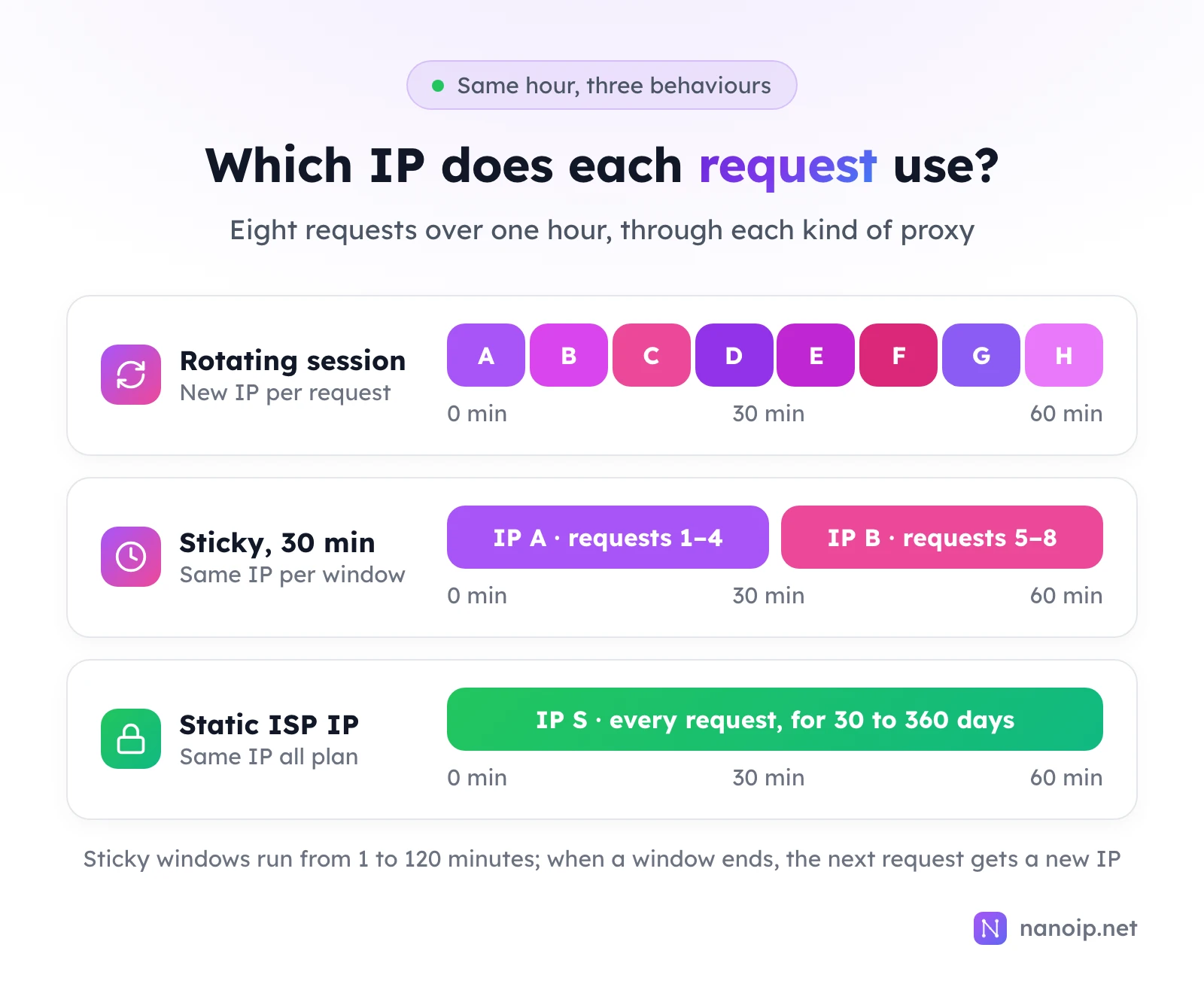
How rotating and sticky sessions work
Both session types run on the same kind of proxy: a dynamic pool of residential or mobile IPs behind one gateway. With NanoIP you always connect to https://gateway.nanoip.net:1111; the gateway decides which exit IP each request leaves from. What changes between the two session types is the rule the gateway follows.
Rotating sessions
In a rotating session the gateway picks a new exit IP for every request. Ten requests leave from ten addresses, often in different cities of the country you selected. Nothing ties one request to the next, which is what you want when the requests are independent:
- Checking prices or stock on many product pages
- Collecting search results for a list of keywords
- Loading the same page from many locations to compare what each region sees
Because the load is spread over many IPs, a rotating session also keeps any single address from carrying an unusual number of requests to one site.
One detail matters in code: for HTTPS sites, the gateway can only switch IPs when a new connection opens, because the requests inside an encrypted tunnel look like one stream to it. Clients that keep connections alive, such as a requests.Session in Python, send their requests through one tunnel and one IP. Using a proxy with Python requests shows how to open a new connection per request.
Sticky sessions
In a sticky session the gateway keeps sending your requests through the same exit IP until the session time runs out. On NanoIP residential proxies you choose that time when you generate the connection, from 1 to 120 minutes. When the window ends, the next request starts a new session on a new IP.
Sticky sessions are for workflows where the site expects consecutive requests to come from one place:
- Signing in and then working inside the account
- Adding items to a cart and going through checkout
- Filling in a multi-page form or an onboarding flow
- Running a test that clicks through several screens of a web app
Rotating vs sticky vs static at a glance
| Rotating session | Sticky session | Static ISP proxy | |
|---|---|---|---|
| Exit IP | New IP on every request | Same IP for the session time | Same IP for the whole plan |
| How long one IP lasts | One request | 1 to 120 minutes (residential) | 30, 180 or 360 days |
| Connection | HTTPS gateway | HTTPS gateway | Each IP's own host and port, HTTP(S) or SOCKS5 |
| Billing | Per GB of traffic | Per GB of traffic | Per IP and period, no traffic charges |
| Best for | Independent requests at scale | Logins, carts, forms, short tests | Accounts and stores used every day |
| NanoIP product | Residential, mobile | Residential, mobile | ISP |
Rotating and sticky sessions draw from the same traffic package, so you can use both on one account: generate a rotating connection for a price-monitoring job and a sticky one for a checkout test, and both are deducted from the same balance.
Which one to choose
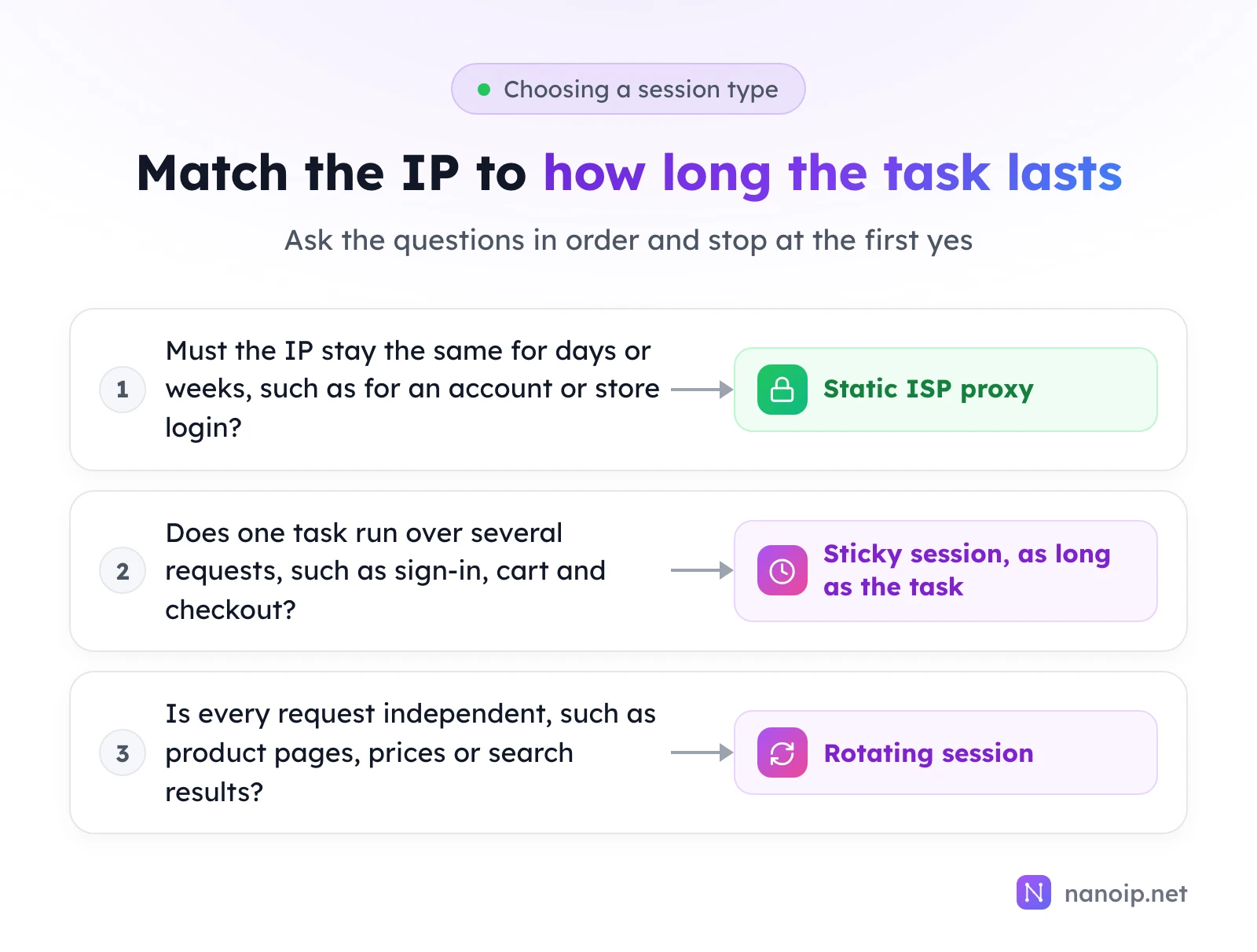
- Choose rotating when no request depends on the one before it, and you want many different IPs: web scraping, price monitoring, SEO rank checks and ad checks across many locations.
- Choose sticky when one task runs over several requests and should see one consistent visitor from start to finish: a login, a checkout, a form, a test run.
- Choose a static ISP proxy when the same account is used again tomorrow and next week. Account dashboards, seller centers and social profiles do better with one long-term IP than with a new sticky IP every session. See account management.
How long should a sticky session be?
Set the sticky time to the length of the task plus a margin, not to the maximum.
- Time the task once. Run it end to end and note how long it takes, for example eight minutes for a sign-in and checkout test.
- Add a margin for slow pages or retries. A task that takes eight minutes fits comfortably in a 15- or 30-minute session.
- Start a new session for the next task. Each task gets a fresh IP, and a failure in one does not carry over to the next.
Longer is not safer. A two-hour session for a five-minute task keeps you on one IP for far longer than you need, and if that IP gets slow, every task you run in the window inherits the problem. Short, task-sized sessions also make it easy to run several tasks in parallel, each on its own IP.
Setting the session type in NanoIP
Rotating and sticky sessions are chosen per connection, in the dashboard's Dynamic Routes page:
- Sign in to the proxy platform and open Dynamic Routes.
- Choose the proxy account and the proxy type (Residential or Mobile).
- Choose the country.
- Choose the session type: rotating, or a sticky duration such as Sticky - 30 min.
- Set how many connections you need and click Generate. Copy the results from Results.
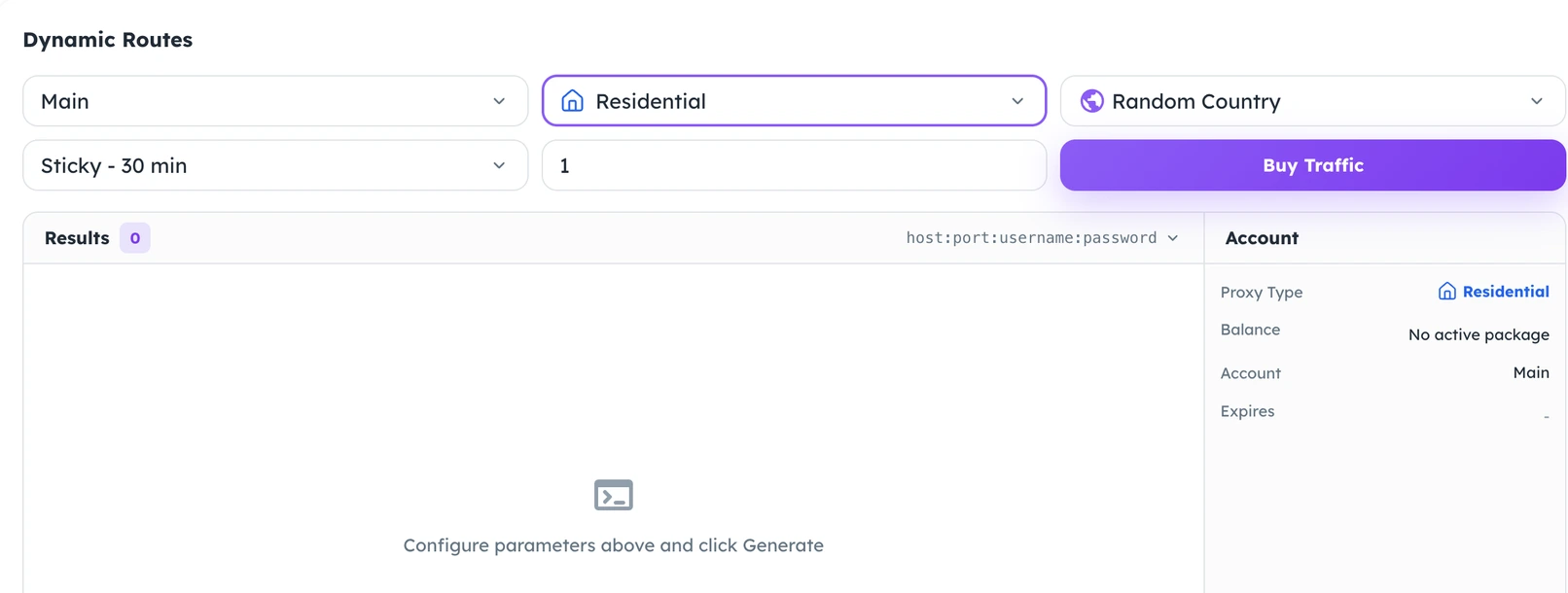
Every connection uses the same gateway, https://gateway.nanoip.net:1111, with the username and password generated for it. To run five checkout tests in parallel, each on its own IP, generate five sticky connections and give one to each test.
Common mistakes
Using rotating sessions for logged-in work
If a site sees the requests of one signed-in session arrive from a new IP each time, it may ask you to sign in again or verify the account. Anything behind a login belongs on a sticky session or a static IP.
Sharing one sticky connection between several accounts
A sticky connection gives everyone who uses it the same IP. Running several accounts through it puts them all on one address. Give each account or task its own connection.
Treating the maximum sticky time as a long-term IP
Two hours is the ceiling, not an extension you can renew. When work needs the same IP across days, move it to an ISP proxy; the guide to choosing ISP proxies lists what to check before buying one.
Frequently asked questions
Do sticky sessions cost more than rotating sessions?
No. Both are billed by the traffic they use and are deducted from the same residential or mobile traffic package. The session type does not change the price per GB.
Can I keep a sticky IP for longer than 120 minutes?
No. When you need one IP for longer than a sticky session allows, use a static ISP proxy: it stays assigned to you for 30, 180 or 360 days, and renewing keeps the same IP.
Do mobile proxies support sticky sessions?
Yes. NanoIP mobile proxies offer rotating and sticky sessions as well, chosen the same way in Dynamic Routes. Mobile IPs can also change when the carrier reassigns addresses.
Is a rotating proxy the same as a residential proxy?
Not quite. "Residential" describes where the IPs come from: home internet connections. "Rotating" describes how often the IP changes. NanoIP residential proxies can rotate on every request or stay sticky; the proxy basics guide explains the other terms you will see.