
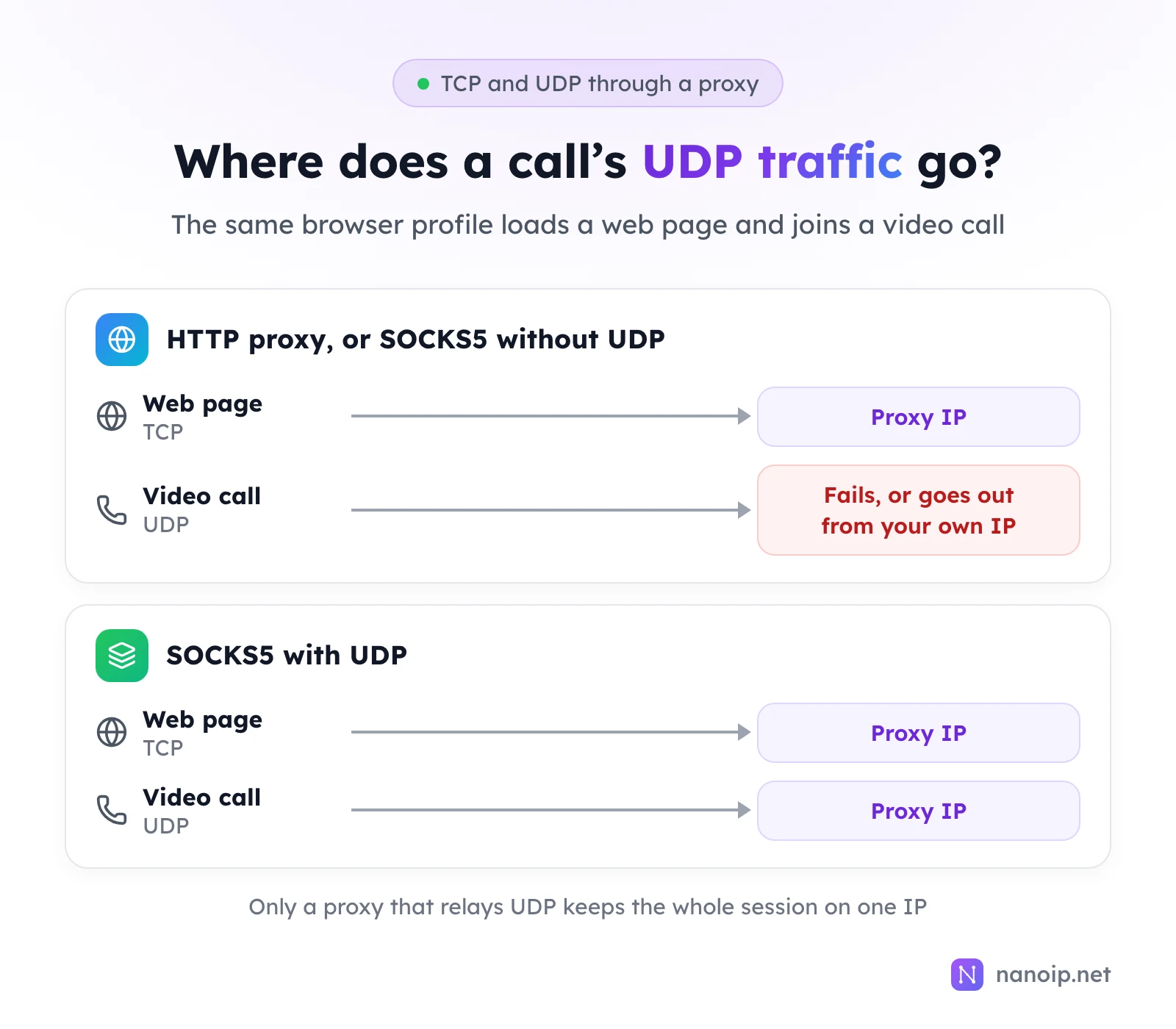
A UDP proxy relays UDP packets, the kind of traffic used by voice and video calls, online games, DNS lookups, WebRTC and HTTP/3. In practice a UDP proxy is a SOCKS5 proxy that supports the UDP ASSOCIATE command: HTTP proxies carry TCP only and cannot relay UDP at all. Without UDP support, those apps either fail or send their UDP traffic from your own IP while the rest of the session uses the proxy. NanoIP ISP proxies relay UDP over SOCKS5 in every location.
TCP and UDP in one minute
Internet traffic travels over two main transport protocols:
| TCP | UDP | |
|---|---|---|
| Connection | Opened with a handshake before any data | None: packets are just sent |
| Delivery | Every packet confirmed, lost ones resent, order kept | No confirmation, no resending |
| Speed | Waits for lost data, so delays add up | No waiting, so lower and steadier latency |
| Used by | Web pages, APIs, email, file transfers | Calls, games, live video, DNS, WebRTC, HTTP/3 (QUIC) |
TCP suits data that must arrive complete. UDP suits real-time traffic, where a late packet is worse than a missing one: a call drops a fraction of a second of sound rather than pausing to wait for it.
Proxy protocols follow the same split. An HTTP proxy relays HTTP over TCP connections. SOCKS5 relays TCP connections and, if the provider enables it, UDP packets. The SOCKS5 vs HTTP guide compares the two in detail.
What needs a UDP proxy
| Traffic | Uses UDP for | Without UDP through the proxy |
|---|---|---|
| Voice and video calls | Audio and video streams | The call fails, falls back to a slower TCP mode, or connects from your own IP |
| Online games | Game state and voice chat | The game cannot connect, or plays from your own IP |
| WebRTC in the browser | Calls, screen sharing, peer connections | The browser may connect directly, and the page can see your own IP |
| DNS lookups | Resolving hostnames | Lookups go to your local resolver, in your own location |
| HTTP/3 (QUIC) | Loading websites | Browsers fall back to HTTP/2 over TCP, so pages still load |
Two rows matter most for proxy users:
- WebRTC. Video meetings, browser-based calls and some chat widgets use WebRTC, which opens UDP connections of its own. If those leave from your own connection, the session uses two IPs: the proxy's for the page and yours for the call. Fingerprint browsers have WebRTC settings for this, and a SOCKS5 proxy with UDP lets WebRTC traffic use the proxy IP as well.
- Desktop and mobile apps. Messaging and calling apps, game clients and streaming software often prefer UDP. If you run them through a proxy, only a UDP-capable SOCKS5 proxy keeps all of their traffic on one IP.
If your work is web pages, APIs and dashboards, you do not need UDP: everything runs over TCP, and browsers load HTTP/3 sites over HTTP/2 when UDP is not available.
How SOCKS5 carries UDP
UDP has no connections, so SOCKS5 sets up a relay instead of a tunnel. The SOCKS5 standard (RFC 1928) defines the steps:
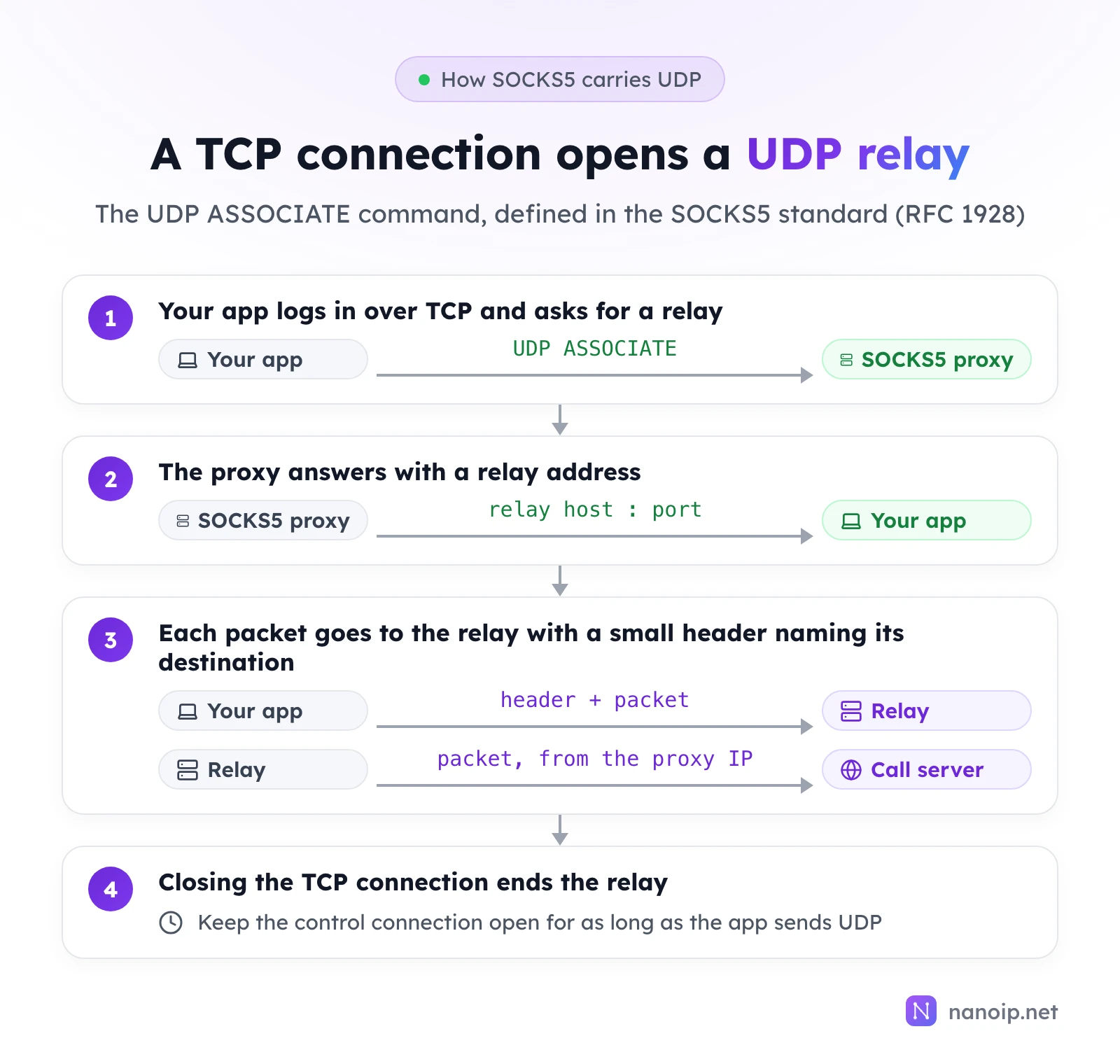
- Your app connects to the proxy over TCP, logs in with its username and password, and sends
UDP ASSOCIATE. - The proxy replies with the address and port of a UDP relay.
- The app sends each UDP packet to the relay with a small header naming the real destination. The relay strips the header and sends the packet on from the proxy IP; replies come back the same way.
- The relay stays open as long as the TCP control connection does. When the app closes it, the relay closes too.
Two consequences follow. First, UDP support is something the provider has to build and enable on its proxy servers, which is why some sell it as an add-on and others do not offer it. Second, the app must implement UDP ASSOCIATE itself: pointing an app at a SOCKS5 proxy does not guarantee that it sends UDP through it.
How to check that UDP uses the proxy
- Use SOCKS5, not HTTP. In your fingerprint browser or app, set the proxy type to SOCKS5 and enter the IP's host, port, username and password.
- Check the app supports UDP over SOCKS5. Look for a UDP option in its proxy settings or documentation. Fingerprint browsers usually describe this under their WebRTC settings.
- Run a WebRTC test. In the browser profile, open a WebRTC test page such as BrowserLeaks' WebRTC test. The public IP it finds should be your proxy IP, not your own.
- Watch the app. For calls and games, the app's own connection details or the other side's view of your location should match the proxy country.
UDP on NanoIP proxies
| Product | UDP | How |
|---|---|---|
| ISP proxies | Yes, in every location | SOCKS5 on the IP's own host and port, same username and password |
| Residential and mobile proxies | TCP traffic | HTTPS gateway gateway.nanoip.net:1111 |
UDP for ISP proxies is an option on the purchase page: switch it on when you order the IP. Each ISP IP is a static address that stays yours for the plan, so calls, app traffic and the browser profile that uses them all come from the same IP every day. That suits account management work where a profile both browses and calls.
The residential and mobile gateway is an HTTPS proxy, which carries TCP: use it for web pages, APIs and scraping, and use an ISP IP over SOCKS5 when the work needs UDP. The guide to choosing ISP proxies lists what else to check on a static IP plan, from bandwidth to device limits.
Frequently asked questions
Can an HTTP proxy carry UDP?
No. HTTP proxies work on top of TCP connections. UDP traffic needs a SOCKS5 proxy with UDP support, or a VPN.
Is a UDP proxy the same as a VPN?
No. A VPN usually captures all of a device's traffic, TCP and UDP, in one encrypted tunnel. A SOCKS5 proxy with UDP works per app: only the apps you configure use it, and each can use a different IP. See what a proxy server is for the full comparison.
Does UDP through a proxy add latency?
A little: every packet makes an extra hop through the proxy. Choose a proxy location close to the server you connect to, such as the country where a game server or call service runs, to keep the extra delay small.
Why do calls still show my own location?
The app is sending UDP outside the proxy. Check that the proxy type is SOCKS5, that UDP is enabled for the IP, and that the app or browser profile is set to send UDP and WebRTC traffic through the proxy.