
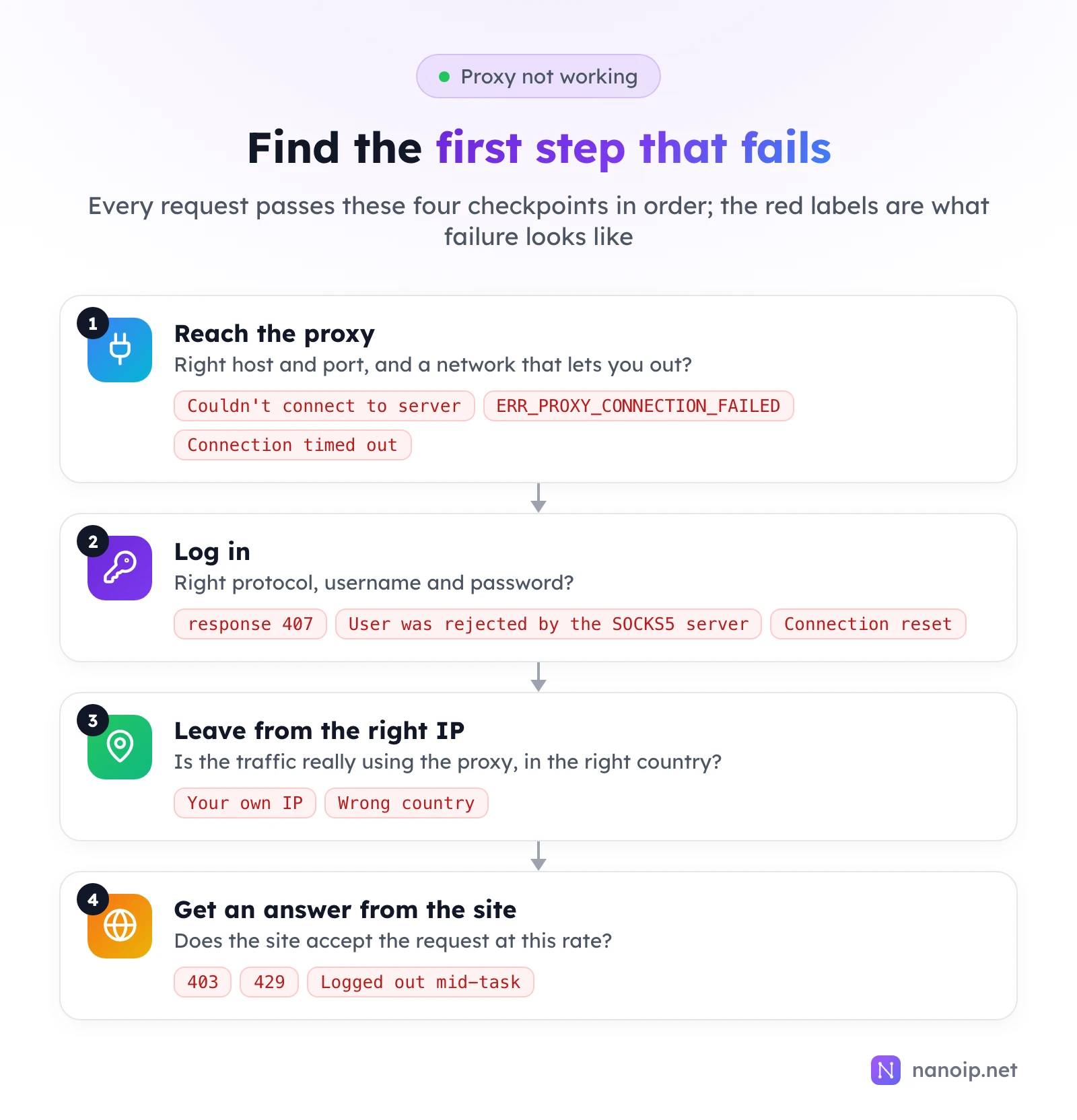
When a proxy is not working, the request is failing at one of four checkpoints: reaching the proxy, logging in to it, leaving from the right IP, or getting an answer from the website. Find the first one that fails and you have the cause. Start by testing the proxy on its own with one curl command: if that works, the problem is in your tool's settings or with the site, not the proxy.
First, test the proxy on its own
Your scraper, browser profile or app adds its own settings on top of the proxy. Take it out of the picture with one request from the command line:
curl -x http://HOST:PORT -U "USERNAME:PASSWORD" https://ipinfo.io/json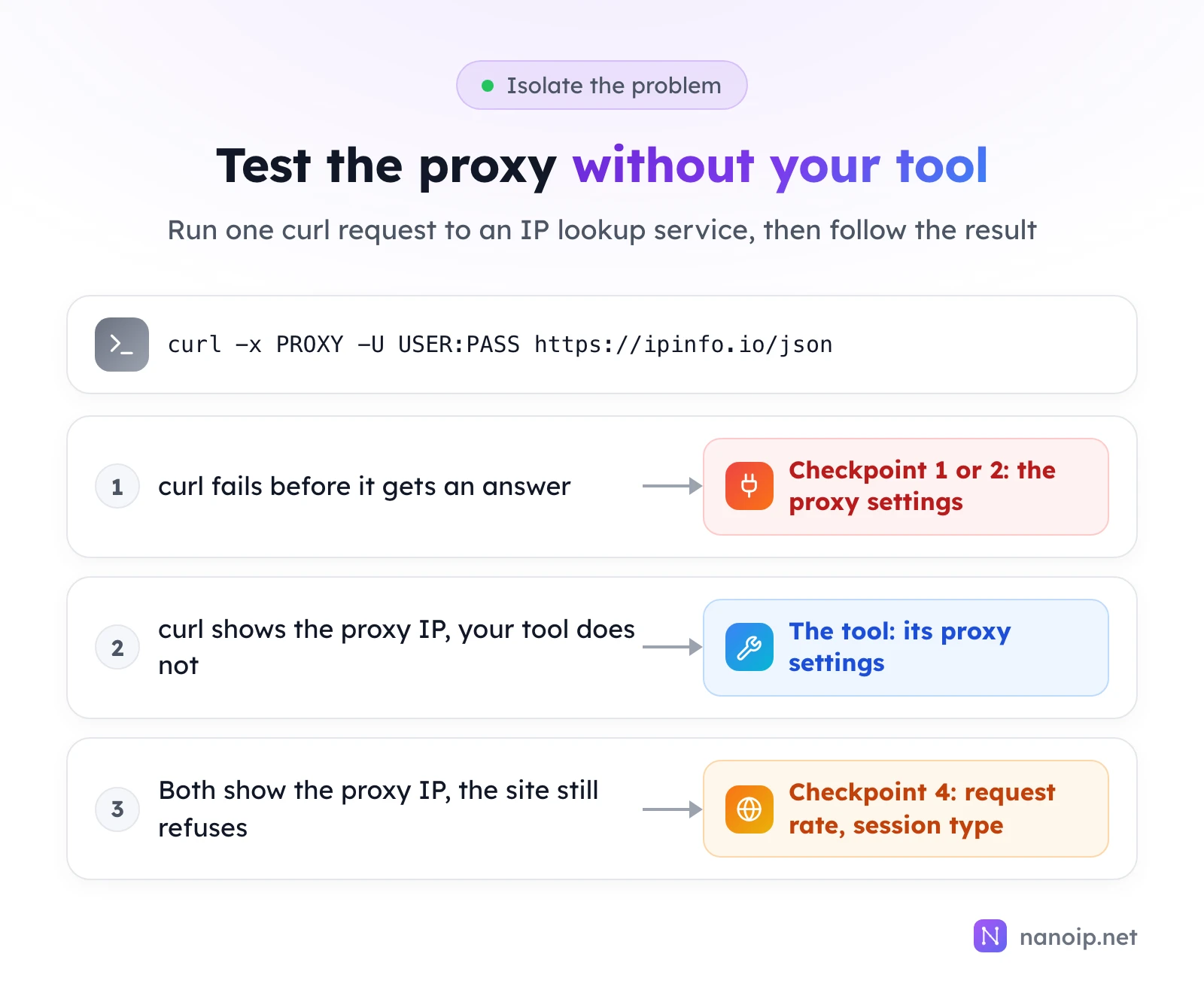
- curl fails: the cause is at checkpoint 1 or 2. The error message tells you which.
- curl shows the proxy's IP and country, but your tool does not: the proxy works; check the tool's proxy settings.
- Both show the proxy IP, but the site refuses: go to checkpoint 4.
The guide to using curl with a proxy explains the flags and how to read -v output.
Checkpoint 1: can you reach the proxy?
| What you see | Where |
|---|---|
Failed to connect to … Couldn't connect to server (exit code 7) | curl |
Connection timed out after … milliseconds (exit code 28) | curl |
net::ERR_PROXY_CONNECTION_FAILED | Chrome, Playwright, Puppeteer |
These all mean the connection to the proxy never opened. Check, in this order:
- Host and port. Copy them again from the dashboard. A port from another IP or product is the most common slip.
- Your network. Office, school and hotel networks often block outgoing connections on non-standard ports. NanoIP's residential and mobile gateway uses port 1111, so if it times out at work but connects from a phone hotspot, the network is blocking it.
- Local VPNs and proxy tools. A VPN or a system-wide proxy app on your computer can catch the connection before it leaves. On our own test machine, such a tool answered for hosts that did not exist and turned clear errors into misleading ones. Turn it off while testing.
Checkpoint 2: does the proxy accept your login?
| What you see | Means |
|---|---|
CONNECT tunnel failed, response 407 | Missing or wrong username or password on an HTTP proxy |
User was rejected by the SOCKS5 server (exit code 97) | Wrong username or password on a SOCKS5 proxy |
Recv failure: Connection reset by peer / net::ERR_CONNECTION_RESET | Wrong protocol, such as http:// sent to a SOCKS5 port |
| Page loads until it times out | In Playwright, a wrong password often looks like this |
Fixes:
- Copy the username and password again, without spaces or line breaks. If you put them in a proxy URL, encode
@,:,/and#. The 407 error guide covers every cause of a refused login. - Match the protocol to the port. Each NanoIP ISP proxy accepts HTTP and SOCKS5 with the same login; residential and mobile proxies use the HTTPS gateway
https://gateway.nanoip.net:1111. - Check the tool can send a login. Chrome's
--proxy-serverflag has no place for credentials, and browsers do not support SOCKS5 with a password. Use HTTP(S) there. - Check the plan. An expired ISP plan or a used-up traffic package stops the proxy from accepting the connection; the dashboard shows days and traffic left.
Checkpoint 3: is the traffic leaving from the right IP?
The site sees your own IP
The proxy works, but the traffic is not going through it.
- The tool ignores your setting. Many apps read only their own proxy setting, not your system's. curl ignores the macOS and Windows proxy settings, and reads
http_proxyonly in lowercase. - Only part of the traffic uses the proxy. HTTP proxies carry TCP only; WebRTC, calls and HTTP/3 use UDP and may go out directly. See what a UDP proxy is.
- The site is on a no-proxy list. Check
NO_PROXY,--noproxyor the tool's list of proxy exceptions.
The IP is in the wrong country
- Residential and mobile: check the country of the route you generated in Dynamic Routes. A route with a random country can exit anywhere.
- ISP: each IP has a fixed country; make sure the tool uses the IP you meant.
- Different lookup services disagree. IP databases sometimes place the same IP in different cities or countries. Check it in two or three services before deciding it is wrong; the IP fraud score guide explains how to read them.
Checkpoint 4: does the website accept the request?
At this point the proxy is doing its job, and the answer comes from the site.
| What you see | Usual cause | What to change |
|---|---|---|
429 Too Many Requests | Too many requests in a short time | Slow down, spread requests out over time, respect the site's limits |
403 Forbidden | The site refuses this kind of access | Check the site's terms; some do not allow automated access at all |
| Logged out or asked to sign in again mid-task | The IP changed during a logged-in session | Use a sticky session or a static ISP IP for anything behind a login |
| Slow pages | Long distance between the proxy and the site | Choose an exit country close to the site's servers |
The session row is the one most often mistaken for a proxy fault. On a rotating route, every request can leave from a different IP, which breaks sign-ins and carts. Use a sticky session for the length of the task, or a static IP for accounts used every day; rotating vs sticky sessions explains how to choose.
When to contact support
If curl with freshly copied credentials fails at checkpoint 1 or 2 from a network you know is open, contact support with:
- the exact error message and the time it happened,
- the product (residential, mobile or ISP) and the route or IP,
- the command you ran.
That is enough to look the connection up. The getting started guide shows where to find your connection details.
Frequently asked questions
Why does the proxy work in curl but not in my browser?
The browser uses its own proxy settings, or the extension or profile you set it in. Check that the browser profile actually has the proxy, and that it uses HTTP(S) when a login is needed.
Why did a working proxy suddenly stop?
Usually the plan expired, the traffic ran out, or the credentials changed. If none of these, test from another network to rule out a block on your side.
Is a slow proxy a broken proxy?
Not necessarily. Measure where the time goes with curl's -w timings: a slow connection to the proxy points at the route to it, while a fast connection with a slow total points at the site or the exit location.