
TCP and UDP are the two main ways data travels across the internet. TCP opens a connection first, confirms that every packet arrives, resends the lost ones and delivers them in order, which suits web pages, APIs, email and file transfers. UDP sends packets without a connection or confirmation, so nothing waits for a lost packet, which suits calls, games, DNS lookups and HTTP/3. For proxy users, the difference decides which proxy you need: HTTP proxies carry only TCP, while SOCKS5 can carry UDP too.
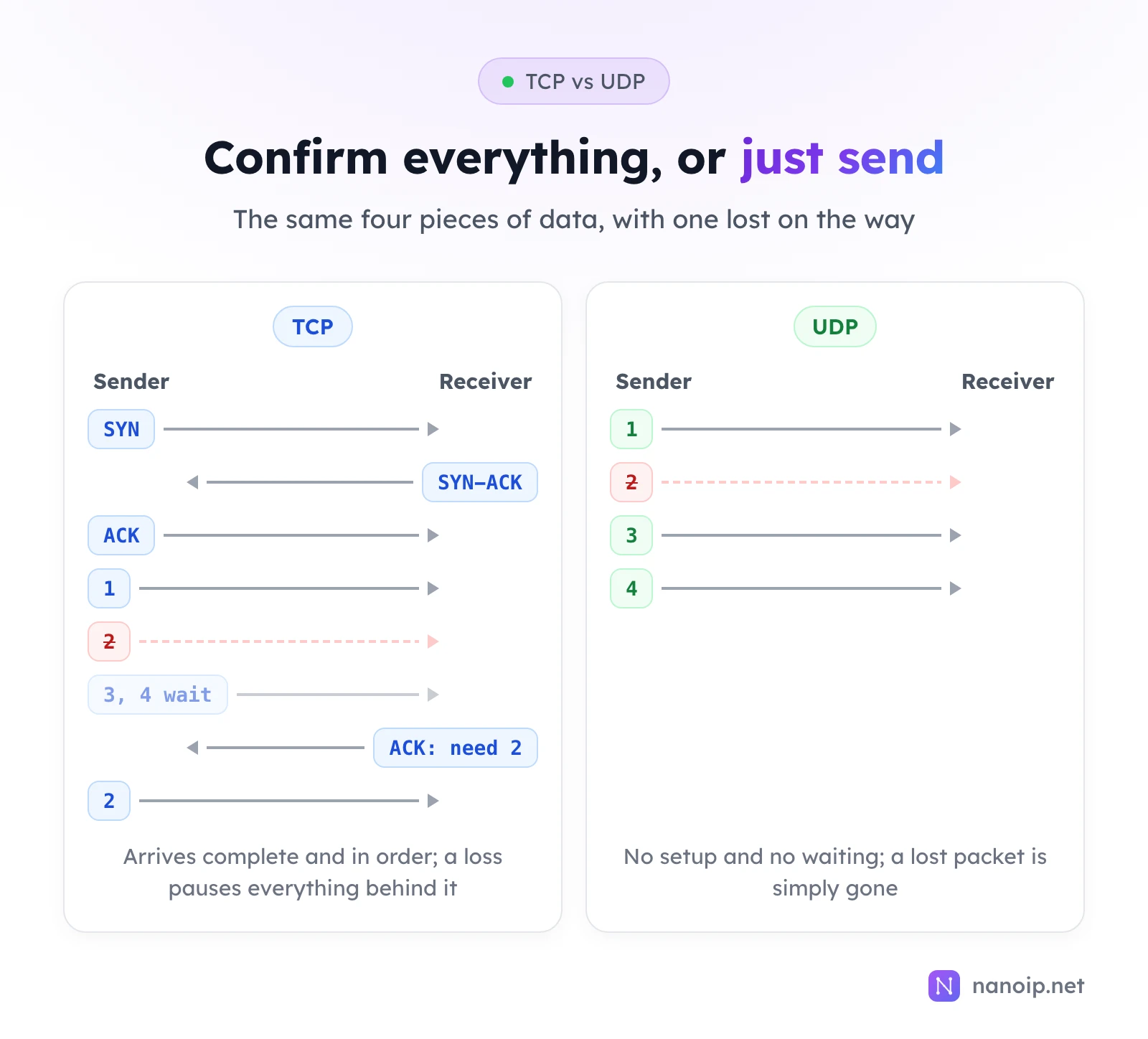
TCP vs UDP at a glance
| TCP | UDP | |
|---|---|---|
| Connection | Opened with a three-way handshake before any data | None: each packet is sent on its own |
| Delivery | Every packet confirmed; lost ones are sent again | No confirmation; lost packets stay lost |
| Order | Data arrives in the order it was sent | Packets can arrive out of order |
| Flow and congestion control | Slows down when the receiver or the network is overloaded | None built in; the app decides |
| Header size | 20 bytes or more | 8 bytes |
| Latency | Higher: setup, waiting for confirmations and resends | Lower and steadier |
| Typical uses | Web pages, APIs, email, file transfers, SSH | Calls, games, DNS, live video, HTTP/3 |
How TCP works
Before sending data, TCP sets up a connection with a three-way handshake: the client sends SYN, the server answers SYN-ACK, and the client confirms with ACK. From then on:
- Every segment is numbered and confirmed. The receiver acknowledges what it got. If a segment goes missing, the sender sends it again.
- Data is delivered in order. If segment 2 is lost, segments 3 and 4 wait at the receiver until 2 arrives. This is called head-of-line blocking: one loss delays everything behind it.
- The sender adapts its speed. TCP slows down when packets are lost, so it does not flood a busy network.
The result is a reliable stream: what goes in one end comes out the other complete and in order. That is exactly what a web page, a file or an API response needs, where a missing byte would break the result.
How UDP works
UDP adds very little on top of the internet itself: a source port, a destination port, a length and a checksum. There is no handshake, no confirmation and no ordering. Each packet (a datagram) is sent and forgotten.
That makes UDP the better fit for real-time traffic. In a call, a packet that arrives half a second late is useless, so it is better to drop it and play the next one than to pause the conversation waiting for a resend. Games, live video and voice all work this way, and DNS uses UDP because a lookup fits in one small packet and simply retries if no answer comes.
Apps that need some reliability on top of UDP build it themselves. The best-known example is QUIC, the transport under HTTP/3: it runs over UDP but adds its own encryption, confirmations and resends per stream, so one lost packet does not hold up every other request on the connection.
Which apps use TCP and which use UDP
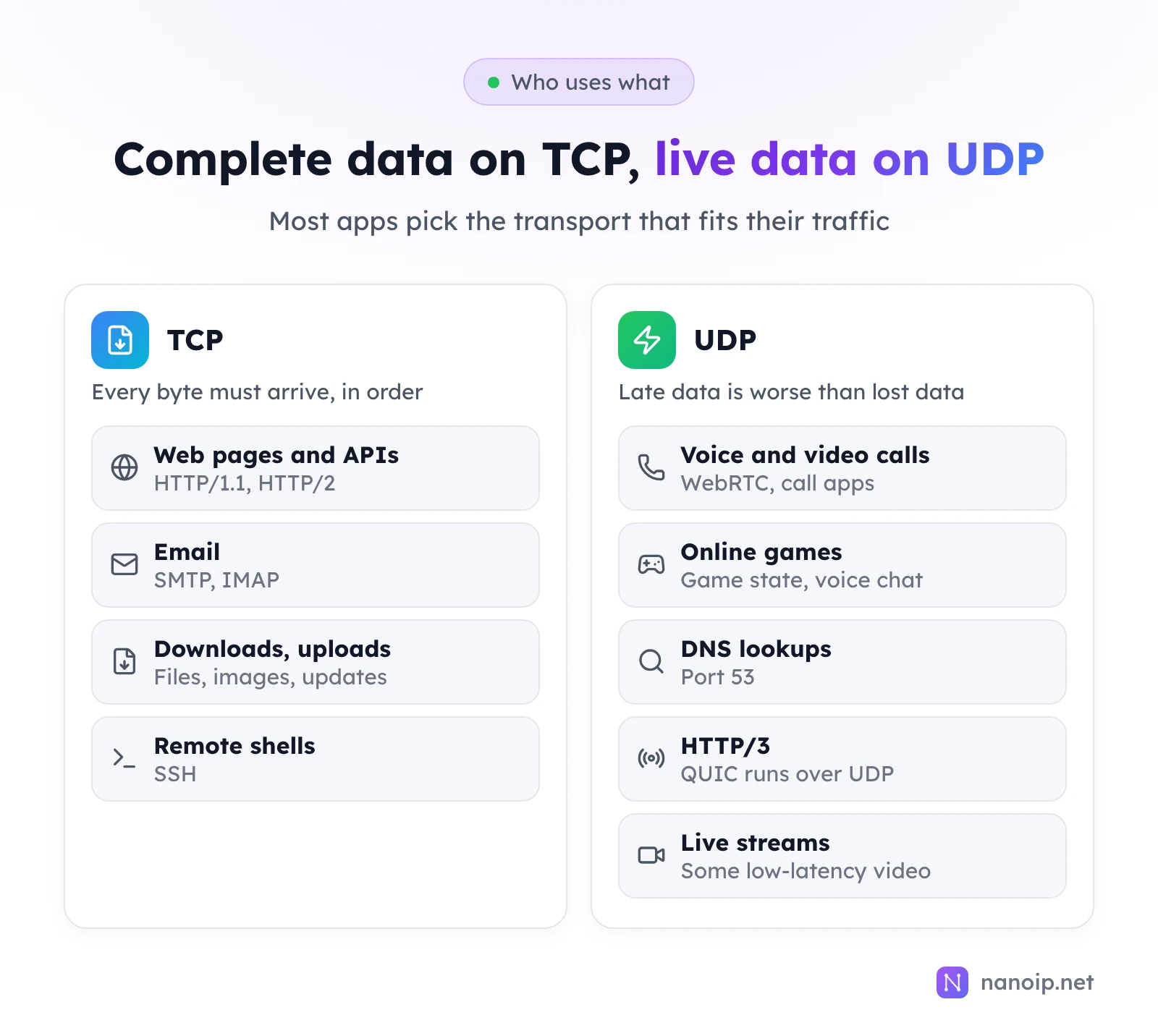
Some protocols use both. DNS uses UDP for normal lookups and TCP for large responses. Call apps often try UDP first and fall back to TCP when UDP is blocked, at the cost of call quality. Browsers try HTTP/3 over UDP and fall back to HTTP/2 over TCP when UDP does not get through, so pages still load.
Is UDP faster than TCP?
For getting the first byte across and for steady real-time streams, yes: there is no handshake and no waiting for lost data. For moving a large file, not necessarily: TCP's flow control and resends are what make a big transfer finish correctly on a lossy network, and an app that sent a file over plain UDP would have to rebuild all of that. Choose by what the data needs, not by speed alone.
TCP, UDP and proxies
This is where the difference matters most if you use proxies:
| Proxy type | TCP | UDP |
|---|---|---|
| HTTP or HTTPS proxy | Yes | No |
| SOCKS5 proxy | Yes | Only if the provider supports UDP ASSOCIATE |
An HTTP proxy works on top of TCP connections, so it cannot carry UDP at all. When a browser profile or app sends UDP through a proxy that does not carry it, that traffic either fails or goes out over your own connection, from your own IP. A SOCKS5 proxy can relay UDP, but the provider has to enable it and the app has to send its UDP through the proxy. The UDP proxy guide explains how that works, and SOCKS5 vs HTTP proxies compares the two protocols.
With NanoIP:
- ISP proxies carry TCP over HTTP, HTTPS and SOCKS5, and UDP over SOCKS5, on every IP.
- Residential and mobile proxies connect through the HTTPS gateway
gateway.nanoip.net:1111, which carries TCP: web pages, APIs and data collection.
For web work, TCP is all you need. Choose a UDP-capable SOCKS5 proxy when the work includes calls, WebRTC, games or apps that rely on UDP, such as browser profiles used for account management that also make calls.
Frequently asked questions
Is UDP less secure than TCP?
Neither encrypts anything by itself. Security comes from the protocol on top: TLS over TCP for HTTPS, and QUIC's built-in encryption for HTTP/3 over UDP. UDP is easier to spoof because there is no handshake, which is why services that answer UDP carefully limit what they send back.
Do TCP and UDP use the same ports?
Both use port numbers from 0 to 65535, but they are separate: TCP port 53 and UDP port 53 are different endpoints. A firewall rule for one does not open the other.
Does HTTP/3 work through a proxy?
Not through an HTTP proxy, which only carries TCP. Browsers then use HTTP/2 over TCP for the same site, so pages load normally. To carry HTTP/3 itself, the proxy has to relay UDP, which in practice means SOCKS5 with UDP support.